
The Grok Bot directory has three layers as of 10 September 2026. xAI's own gallery lists 56 named roles at x.ai/bot/use-cases. xAI's official Bot Marketplace lists 69 public bots from 43 creators. Nine independent directories index shared bots. Each holds between 30 and 751 entries.
This page lists all 56 roles by function. Each row shows what the role does in xAI's wording, the apps it reaches, and where it stops. The page then explains how sharing works, what the marketplace and the independent directories hold, and how to vet a shared bot. Every row names a source and a fetch date. For what the roles are good at in practice, see Grok Bot use cases.
57%
of organizations now deploy AI agents for multi-stage workflows. A directory of named roles is the single-owner version of the same idea: one standing job per bot, with a human approval gate at the end of each.
Source: Anthropic, The 2026 State of AI Agents Report (500+ technical leaders, with Material)iShort answer
xAI's Grok Bot gallery names 56 roles across nine functions. Nearly every role that touches the outside world stops at a draft, a queue, or an approval. When you share a bot, xAI publishes its identity, description, skills, and routines to a public link. The recipient gets a copy and never your computer, logins, or conversation history. The official Bot Marketplace held 69 public bots on 10 September 2026, and nine independent directories index up to 751 shared bots each. xAI verifies none of them. A shared bot inherits the account's one shared computer, so it can reach every login on it. Squad (formerly MissionControlHQ) builds a roster for your specific business and sets a permission level per agent. A squad is a coordinated set of specialist AI agents that share one task board, not one generalist agent doing everything. It costs $99/mo flat on your own AI accounts.
Key takeaways
| The question | The answer |
|---|---|
| How many named roles xAI publishes | 56, in nine functions: Marketing 13, Sales 10, General 6, Operations and Finance 5, Product 5, Engineering 5, Customer Success and Support 4, Recruiting and People 4, Life and Leverage 4 (10 September 2026) |
| Where each role stops | At a review list, a parked draft, a held adjustment, or a confirm-before-booking step. xAI's docs give eight roles an explicit stops-before line |
| What a share copies | Identity, description, skills, and routines. Not the computer, logins, conversation history, or learned memory |
| The official directory | The Bot Marketplace at x.ai/bot/marketplace: 69 public bots, 43 creators, 9 categories |
| The independent directories | Nine verified, 30 to 751 entries each, all independent of xAI, all pointing back to x.ai share links |
| Who checks shared bots | Nobody. xAI's terms say it does not verify or endorse them; the largest catalog reports 0 verified of 726 listed |
| The limit every directory shares | A shared bot lands on the account's one shared computer with every login on it. Isolation is per user, not per bot |
Roles come from xAI. Shared bots come from users. The sharing rules come from the docs and the terms.
Layer 1: xAI's gallery
56 named roles in nine functions at x.ai/bot/use-cases. Each has a description, the apps it reaches, and an approval gate written into the text.
Layer 2: the official marketplace
69 public bots from 43 creators in nine categories at x.ai/bot/marketplace, each with an Add button and a named creator.
Layer 3: independent directories
Nine listings, eight sites and one GitHub repo. Each indexes public share links and holds 30 to 751 entries. All label themselves not affiliated with xAI.
The sharing rule
A share copies identity, description, skills, and routines. It never copies the computer, logins, or history. xAI does not verify third-party bots.
xAI's gallery: 56 named roles by function
xAI's gallery at x.ai/bot/use-cases lists 56 roles as of 10 September 2026, the same count and category split as on 25 August 2026. The page's own description: "Work you can hand to Grok Bot. Search for the job you need done, or browse by category."
The tables below use four columns. "What it does" is xAI's own wording, trimmed to the operative clause. "Reaches" lists the apps or sites the entry names. "Stops at" is the approval gate in the entry's own text, or "not stated" when the entry names none. Eight roles also carry an explicit stops-before line in xAI's documentation, marked "docs" below.
General (6)
| Role | What it does | Reaches | Stops at |
|---|---|---|---|
| Chief of Staff | "Scans Slack, email, calendar, and meeting notes and delivers a succinct read out on what's new and what maps to your priorities" | Slack, email, calendar, meeting notes | Docs: stops before sending messages or changing meetings |
| Daily Briefing Writer | "Delivers a tight daily brief of only the stories that matter to you" | Not named | A brief; no external action |
| Executive Assistant | "Delivers a morning briefing, plus an automatic catch-up summary whenever you join a new room" | Chat rooms and channels | A briefing; no external action |
| Inbox Manager | "Triages your inbox into clear categories, surfaces urgent and blocked threads, and drafts replies and cleanup" | "Every send stays behind your approval" | |
| Presentation Designer | "Uses your master template and brand system and delivers an editable link ready to refine and present" | Your deck template | An editable link; you present |
| Status Report Writer | "Pulls open action items from docs, meetings, and Slack into one living list and a morning digest" | Docs, meetings, Slack | A list and a digest; no external action |
Sales (10)
| Role | What it does | Reaches | Stops at |
|---|---|---|---|
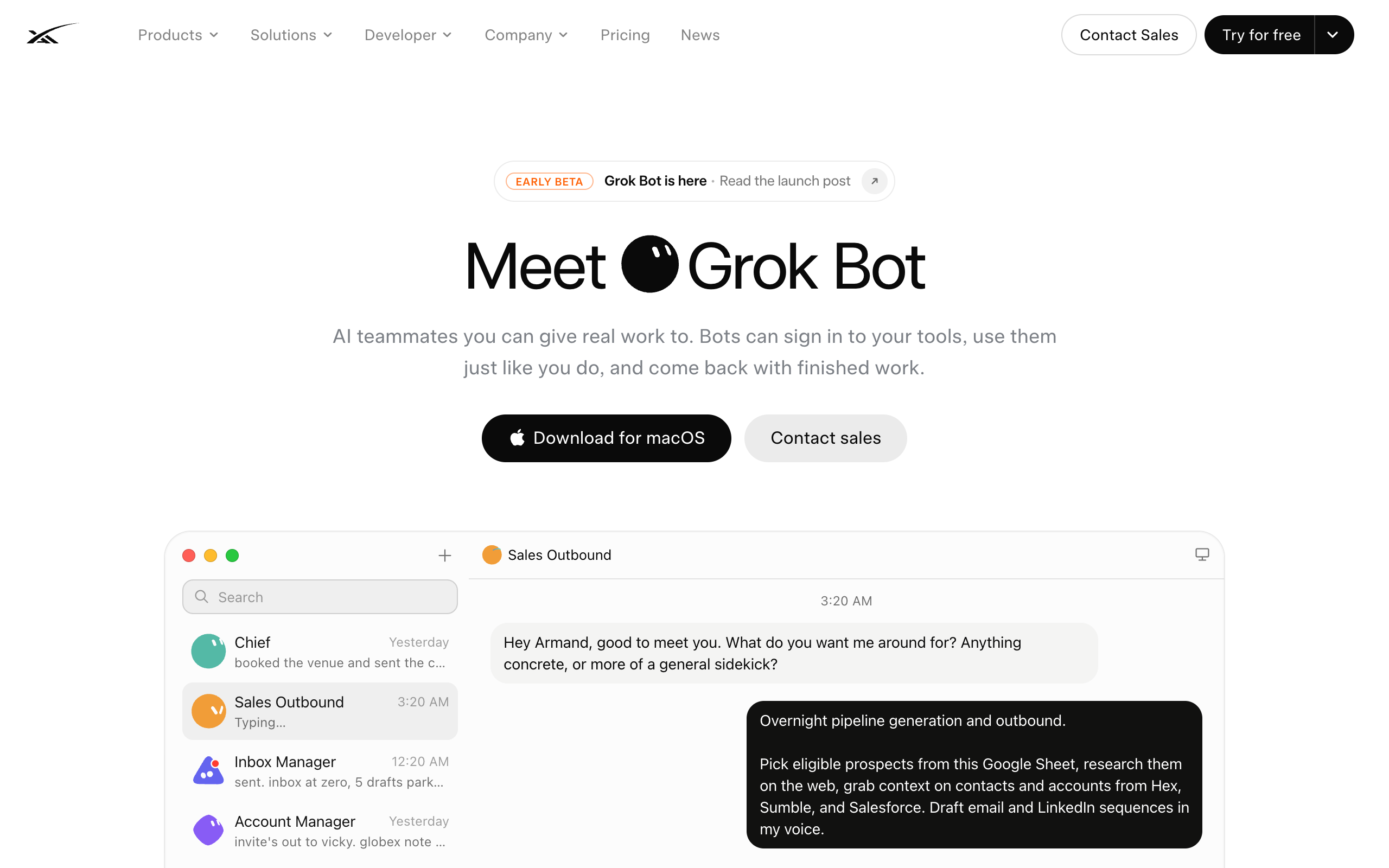
| Sales Outbound | "Researches accounts overnight, scores contacts with intent, drafts email and LinkedIn in your voice" | Email, LinkedIn; the demo adds a Google Sheet, Hex, Sumble, Salesforce | "Leaves a review list for you to approve." Docs: stops before sending or enrolling contacts |
| Account Research Specialist | "Pulls Salesforce + live signals, scores fit and warmth, and builds a shareable research pack per account" | Salesforce, live signals | A research pack; no external action |
| CRM Operations Manager | "Handles CRM and org-chart hygiene before and after meetings so records stay current" | CRM | Not stated; it writes to the CRM |
| Deal Desk Coordinator | "Draft contextual internal deal notes from past emails, Salesforce, and calls" | Email, Salesforce, call records | "Submit in Salesforce once you approve" |
| Deck Updater | "Updates your deck from discovery notes mid-call or right after, with next steps baked in" | Your deck, discovery notes | Not stated |
| Meeting Prep Buddy | "Builds prep packs from calendar, notes, CRM, Gong, and Slack" | Calendar, notes, CRM, Gong, Slack | A prep pack; no external action |
| Pipeline Analyst | "Scrubs Salesforce + sheets, flags stalls and commit risk, and drops a Monday scoreboard" | Salesforce, spreadsheets | A scoreboard; no external action |
| Prospecting Plan Builder | "Seeds contacts, enriches email/mobile, and writes a ready-to-work tracker" | Contact enrichment, a tracker | A tracker; no sends |
| Renewal Desk Operator | "Builds a 90-day pack per account from usage, tickets, Gong, and CRM, drafts the commercial note" | Usage data, tickets, Gong, CRM | A drafted note; "nudges legal only when terms are stuck" |
| Sales Call Coach | "Reviews Gong calls and leaves timestamped coaching on discovery, objections, and executive presence, plus a call score" | Gong | Comments and a score; no external action |
Marketing (13)
| Role | What it does | Reaches | Stops at |
|---|---|---|---|
| Paid Media | "Pulls live channel and campaign data, Slacks a recommended reallocation against your monthly budget" | Ad channels, Slack | "Holds for your approval before making adjustments." Docs: stops before changing budgets or sending messages |
| Community Operations Manager | "Screens apps, triages DMs across channels, and drafts nurture on a cadence" | DMs across channels | Drafts the nurture |
| Compelling Events Monitor | "Watches leadership posts for awards, launches, and hiring signals, then sends a short digest of posts to engage with" | Social posts | A digest; you engage |
| Competitive Intelligence Analyst | "Monitors overnight for new launches and audits your site for fatigued creatives and stale messaging" | The web, your site | "Suggest changes for you to make" |
| Event Guest Screener | "Scores event applicants against your ICP and batch-approves strong fits in the invite tool" | The invite tool | Not stated; it approves in the tool |
| Internal Communications Manager | "Draft clear, on-voice copy from your real context, matched to each audience and channel" | Internal channels | "Review-only so it never sends on its own" |
| LinkedIn Campaign Manager | "Own lead-gen funnel consistency across ads, forms, follow-up, and UTMs" | LinkedIn ads, forms | "Drafts campaigns for approval" |
| Marketing Calendar Owner | "Pulls from Notion and keeps webinars and campaigns current without a weekly chase" | Notion, calendars | Not stated |
| Merch Fulfillment Operator | "Runs outreach, watches the redemption form... and sends your swag vendor a daily order form" | Redemption form, chat, vendor email | "Pings you to approve/reject submission in chat" |
| Newsletter Writer | "Pulls what's new from launches, wins, and your calendar, writes the issue in your voice" | Launch notes, your calendar | "Parks it for review so marketing can edit once and send" |
| Paid Media Creative Strategist | "Writes a sharp why-it-works hypothesis and proposes the next test. No invented metrics" | Ad creative data | A proposal; no external action |
| SEO / AEO Auditor | "Track keyword, technical, AI-prompt, and competitor movement in one place" | Keyword and technical data, your site | "An optimization plan you can act on" |
| Social Media Manager | "Studies your real history, drafts when something noteworthy ships" | Your social accounts | "Parks posts for you to publish" |
Customer Success & Support (4)
| Role | What it does | Reaches | Stops at |
|---|---|---|---|
| Account Health | "Reads usage and signals across your book and turns portfolio noise into a clear watch list" | Usage data, your book of accounts | A watch list. Docs: stops before contacting customers or editing the CRM |
| Account Manager | "Preps every call from transcripts, notes, CRM, and Slack, drafts follow-ups, and keeps next steps current" | Transcripts, notes, CRM, Slack | Drafts the follow-ups |
| Enablement Fulfillment Specialist | "Finds Zoom assets, builds one-pagers, uploads to Drive, and drafts the reply with links" | Zoom, Drive | "Drafts the reply" |
| Ticket Triage Specialist | "Watches support on a cadence, drafts replies only, and stays quiet when it's clean" | The support queue (the homepage demo shows Zendesk) | "Drafts replies only" |
Recruiting & People (4)
| Role | What it does | Reaches | Stops at |
|---|---|---|---|
| Calendar Coordinator | "Schedules across calendars and chases the holds nobody else has time to chase" | Calendars | Not stated; it schedules |
| Hiring Screener | "Scores applications or work samples against a defined bar and hands off an ATS-ready review" | Applications, the ATS | A review handed off |
| Onboarding Manager | "Builds the checklist, pulls the right docs, answers day-one questions, and routes each ask to whoever can unblock it" | Docs, chat | Routes asks to people |
| Talent Scout | "Sources, drafts outreach in your voice, skips people already in the ATS" | Sourcing sites, the ATS, calendars | "Handles scheduling once you approve." Docs: stops before contacting candidates |
Operations & Finance (5)
| Role | What it does | Reaches | Stops at |
|---|---|---|---|
| Contract Desk | "Summarizes by stage and owner, pulls key terms, and flags blocked reviews" | Contracts | A summary; no external action |
| Expense Manager | "Builds the weekly summary from your expense manager and sheets, logs new receipts from email" | Expense tool, spreadsheets, email | "Nudges owners on missing categories before review." Docs: stops before sending messages or changing reimbursements |
| Invoice Coordinator | "Forwards invoices, matches what it can, tracks campus or vendor actuals" | Email, invoices | "Nudges the right owner when something needs a human" |
| Security Questionnaire Filler | "Logs into the questionnaire site, pulls answers from your trust center and past RFPs, drafts every field" | Vendor portals, your trust center, past RFPs | "Parks the submit for you" |
| Vendor Portal Operator | "Run renewals, seats, and procurement on portals with no clean API" | Vendor portals | "Comes back with exceptions only" |
Product (5)
| Role | What it does | Reaches | Stops at |
|---|---|---|---|
| Beta Adoption Watcher | "Monitors usage and surfaces which customers are in, so the team can follow up" | Usage analytics | A list; the team follows up |
| Call FAQ Miner | "Tracks questions, timestamps answers, and links back to the source recording" | Call recordings | A list; no external action |
| Docs Auditor | "Diffs help center and internal notes against what shipped last week, flags stale pages" | Help center, internal notes | "Drafts the rewrite" |
| Feature Request Tracker | "Mines Slack and calls into a living list tied to customers" | Slack, calls | A list; no external action |
| Product Feedback Analyst | "Collects and clusters feedback from connected sources, weighs evidence and urgency" | Connected feedback sources | "Drafts routing recommendations for approval" |
Engineering (5)
| Role | What it does | Reaches | Stops at |
|---|---|---|---|
| Bug Reproduction | "Clicks the same path in staging, captures the failure, and drops a repro pack (steps, screenshots, network notes)" | Staging | A repro pack. Docs: stops before using production customer data |
| Cloud Agent Orchestrator | "Kicks off runs, monitors, chases what's stuck, and summarizes the report" | Cloud agent runs | A summary |
| Playtest Operator | "Drives the UI on a computer, captures failures, and returns a tight findings pack" | The product UI | A findings pack |
| Product Performance | "Logs into observability tools, walks the flamegraphs, and comes back with hotspots plus a short writeup" | Observability tools | A writeup. Docs: stops before changing alerts or production settings |
| Prototype Builder | "Writes on its computer and comes back with a screenshot plus a live URL" | Its own computer | A screenshot and a URL |
Life & Leverage (4)
| Role | What it does | Reaches | Stops at |
|---|---|---|---|
| Apartment Scout | "Filters listings, emails to book tour times, and applies for the ones you pick" | Listing sites, email | "Applies for the ones you pick" |
| Personal Site Builder | "Scaffold a personal site from a description, untangle domain issues" | Its own computer, your domain | "A live starting point" |
| Subscription Cleaner | "Collates receipt and newsletter mail, suggests what to kill" | "Unsubscribes what you approve" | |
| Travel Coordinator | "Compares flights and hotels to your rules... and drops itinerary plus calendar" | Flight and hotel sites, calendar | "Confirms before booking" |
51 of the 56 entries either name an approval gate or end at a draft, list, pack, or summary. The five that write into a system with no stated gate are all internal hygiene roles: CRM Operations Manager, Deck Updater, Marketing Calendar Owner, Calendar Coordinator, and Event Guest Screener. Every role runs on the account's one shared computer. The "Reaches" column names what each entry reaches, and it does not cap what the role can touch. The Grok Bot best practices page covers what that means for what you put on the machine.
How sharing a Grok Bot works
When you share a bot, xAI publishes its configuration to a public link. When someone adds that link, xAI creates a copy on their account. The mechanics come from xAI's documentation at docs.x.ai/grok-bot/bots, fetched 10 September 2026.
xAI defines what a bot is: "A Bot is a durable AI teammate with a name, a job, its own conversation, and working context that develops over time." The docs name Talent Scout, Expense Manager, Bug Reproduction, and General Helper as example jobs. The Get started page adds a suggested-teammate flow: "Choose a suggested teammate from Meet a future teammate, or choose Create your own and give the Bot: A short name, One primary job, A description of how it should work."
The docs cover sharing: "Share a public link when someone else should start from the same Bot." The recipient opens a preview on x.ai and chooses Add to Grok Bot. They need the app installed to finish. "The link is public. Anyone who has it can view the Bot's shared configuration, including its identity, description, skills, and routines."
| What moves with a share or duplicate | Share (public link) | Duplicate (same account) |
|---|---|---|
| Identity, description, avatar | Yes | Yes |
| Skills | Yes, "skills" per the docs | Yes, "enabled skills" |
| Routines | Yes | Yes |
| The computer, files, and logins | No: "does not give them your computer, logins, or conversation history" | Shared already on the same account |
| Conversation history | No | No |
| Learned memory and chat attachments | Not listed as shared | No: "does not copy conversation history, learned memory, or chat attachments" |
| Accounts and integrations | Recipient connects their own | Already connected |
Adding a shared bot "accepts the third-party bot terms." Those terms, effective 22 August 2026 and issued by SpaceXAI LLC (the legal entity on xAI's site), state that third-party bots "are created by other users, not by SpaceXAI," that the bot "may perform actions on your behalf, including reading, writing, and sending data," and that the company "does not verify, endorse, or guarantee the functionality or safety of third-party bots." The terms tell sharers to review the configuration "for sensitive information (API keys, internal URLs, customer data, personal information) before sharing," because "Anyone with the share link can view and install your bot's full configuration."
On team plans, an admin setting keeps sharing inside the team: "Off keeps Bot template sharing within your team, and the policy is enforced on Cursor's servers." Enterprise accounts start with public sharing turned off. Two secondary sources, aibuilderclub.com and daily.dev, date the public template-sharing launch to 28 August 2026. xAI's docs do not date it.
The official Bot Marketplace
xAI runs its own directory of shared bots at x.ai/bot/marketplace. On 10 September 2026 the page listed "69 public Bots" from "43 creators" in "9 categories": From Grok Bot Team, Engineering, Sales, Marketing, Design, Personal, Recruiting & People, Operations, and Product. The homepage links to it as "Explore more bots."
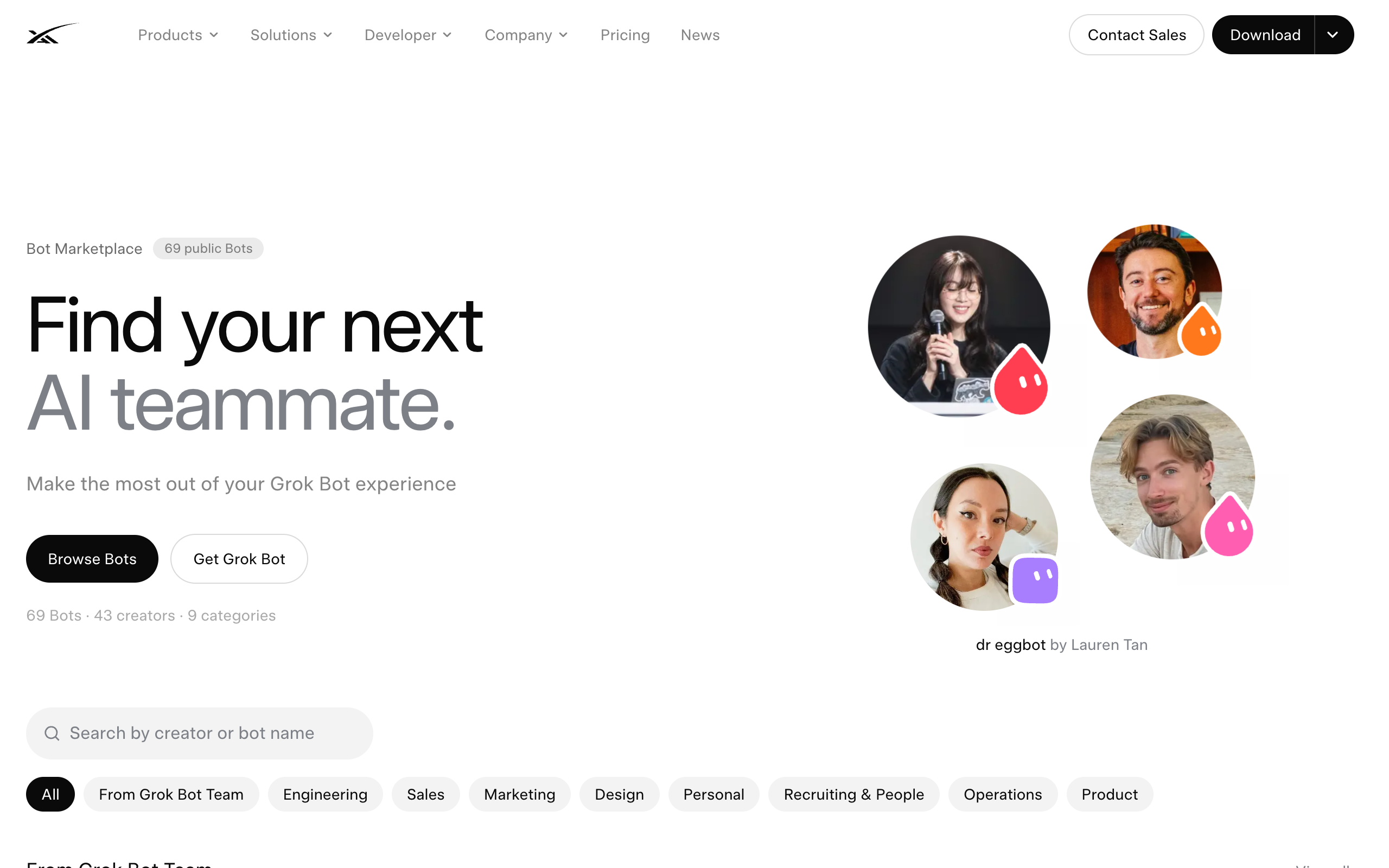
Each card shows the bot's name, its creator, a description, and an Add button. Many descriptions state their own approval gate. Examples from the page:
| Bot | Creator | Category | The gate in its own description |
|---|---|---|---|
| Outbound Prospecting | Krista Letz | From Grok Bot Team | "nothing sends without your yes" |
| Haggle Bot | Daniel Gartshein | From Grok Bot Team | "Never spends, signs, or sends without you" |
| Recruiting Coordinator | Tommy Hansen | From Grok Bot Team | "never emails a candidate without you" |
| Lingxi's Engineer Bot | Lingxi Li | Engineering | "only asks you to merge" |
| Meeting Recap Deck | Krista Letz | Sales | "never invents a quote" |
| Copy Humanizer | Massimo De Luisa | Marketing | "never invents a fact" |
| Critiquito: Design Critique | Manuel Muñoz Solera | Design | "never edits your files" |
| Office Ops Desk | Erika Cabrera | Operations | "never sends without you" |
| Alfred | Robin Delta | Operations | "never creates or changes anything without your exact yes" |
| Product Idea Stress Test | Hiten Shah | Product | Output only: what has to be true, evidence for and against |
xAI curates the marketplace. It holds 69 bots, against several hundred on the independent sites. It is also the only directory whose listing sits on xAI's domain.
Independent directories of shared Grok Bots
Nine independent directories list shared Grok Bots, each verified on 10 September 2026. None is affiliated with xAI, and each says so in its own words. None installs a bot itself. Every one links to an x.ai share page, where the Add to Grok Bot button lives.
| Directory | Entries (10 Sep 2026) | Categories | Its own wording |
|---|---|---|---|
| gtemplate.net | 751 bots | Work 358, Research 60, Creative 104, Personal 229 | "751 public Grok Bots for work and life in one searchable directory, handpicked daily and ready to add." "Not affiliated with xAI." |
| awesome-grok-bot (GitHub) | 726 shares; 25 stars | Coding & shipping 110, Inbox & calendar 30, Research & briefings 89, Customer & sales 48, Finance & ops 80, Content & publishing 107, Personal admin 157, Teams & handoffs 105 | "All 726 share pages returned HTTP 200 on 10 Sep 2026." Review status "0 verified / 726 listed." "Community shares are untrusted." |
| botdirectory.ai | 641 prompts, 213 tagged Grok | Productivity, Sales, Marketing, Ops, Success, Personal | "A public directory of ready-to-copy prompts for Grok Bot, Rakazo, and other AI agents." Edits "open a pull request." Share URLs: "Never invent one." |
| grokbot.dev | "over 600" claimed; 529 shown by category | Chief of Staff & orchestrators 98, Work/ops 138, Money 76, Personal 65, Research 64, Creator 50, Dev 38 | Each entry "shared by" a named X handle. Its claim that xAI "has not opened a public catalogue" is out of date. |
| grokbot-templates.com | 574 templates; 8 team blueprints | Assistants, Engineering, Research, Money, Sales, Creative, Life | "A public wall of Grok Bot templates." "Not affiliated with xAI, Grok, or X." "Nothing is installed on this site." |
| grokmarket.io | 495 templates | Engineering, Publishing, Creative, Research, Business, Personal, Operations | "The independent Grok Bot template directory." "Not affiliated with xAI." |
| grokbottemplates.dev | 484 bots | Assistants 71, Engineering 108, Research 28, Money 39, Sales 43, Creative 88, Life 107 | "Search 484 public Grok bots." "Independent and not affiliated with xAI." Has a share-link inspector. |
| grokshelf.com | 44 verified bots; 74 setups | Research, Coding, Sales, Marketing, Operations, Productivity, Recruiting, Customer Success, Finance, Personal, Other | "An independent community directory... not affiliated with, endorsed by, sponsored by, or associated with xAI or Grok." |
| usebot.net | 30 bots | Workflows, Engineering, Research, Money, Creative, Everyday life | "Independent guide; not affiliated with Cursor or xAI." |
The directories overlap heavily, because all of them index the same public x.ai share links. The totals do not add up. The counts are entries, not distinct working bots. The largest catalog checked only that its 726 pages loaded. Every directory's Add button ends on x.ai, so the listing site never touches your account.
How to vet a shared bot before adding it
A shared bot arrives with its instructions and gets the same reach as every other bot on the account. The vetting steps below come from xAI's terms and from the directories' own guidance, not from testing.
- Read the full configuration on the x.ai preview. The terms require that "you have reviewed the bot's description and understand what it does." The preview shows identity, description, skills, and routines.
- Check what it wants to reach. The terms state the bot may act "through your connected accounts." awesome-grok-bot's rule: "connect one plugin, try a read-only task, then enable writes."
- Treat any request for a key or password as a stop. grokbot.dev: "treat any request for a key or a password as a reason to walk away." awesome-grok-bot: "Do not paste API keys into SETUP."
- Account for the shared computer. xAI's FAQ states that isolation is per user, not per bot. A shared bot's description can promise restraint. The architecture does not enforce it. The Boundary Test covers this in full.
- Do not re-share without permission. The terms: "You may not redistribute, re-share, or re-export this bot or its configuration without the creator's permission."
Connecting apps to any agent platform raises the same questions about scope. The connecting AI agents to business apps page covers the general version.
User-built bots documented on this site
The Grok Bot examples page catalogues named bots that real users built, with their sources. That page holds more than 30 bots. The cross-reference below shows which gallery role each documented setup maps to. The full list, with what each bot produced, stays on the examples page.
| Documented bot | Owner | Closest gallery role |
|---|---|---|
| Eve, Chief of AI Staff | Brandon Charleson | Chief of Staff |
| Postmaster | Brandon Charleson | Inbox Manager |
| Talia, CFO bot | Brandon Charleson | Expense Manager |
| YouTube Researcher, X Scout | Peter Yang | Competitive Intelligence Analyst, Compelling Events Monitor |
| Digital Marie Kondo | Peter Yang | Subscription Cleaner |
| Personal Concierge; Atlas | Peter Yang; Paul J Lipsky | Travel Coordinator |
| Lincoln | Paul J Lipsky | Account Research Specialist |
| EA bot | Riley Brown | Executive Assistant |
| Developer agent | Riley Brown | Prototype Builder |
| X researcher, X creative, X drafter | Clearmud | Social Media Manager |
This site made the mapping, not xAI. Every documented fleet is a one-owner setup. The examples page explains why. No published fleet runs separate clients on one account.
Which directory to use
| Scenario | Best pick | Why |
|---|---|---|
| You want to know what a role is for before building it | xAI's gallery (56 roles) | Vendor-written descriptions with the approval gate in the text. Start with the function tables above. |
| You want a bot with a named creator you can look up | The official Bot Marketplace | 69 bots, 43 creators, on xAI's domain. Smallest catalog, most attribution. |
| You want the widest search | gtemplate.net or awesome-grok-bot | 751 and 726 entries. Overlapping, unverified, all pointing to x.ai share links. |
| You want to inspect a share link before adding it | grokbottemplates.dev | Its share-link inspector shows the configuration outside the app. |
| You want prompts rather than share links | botdirectory.ai | 641 copyable prompts, 213 tagged Grok, community-edited through pull requests. |
| You want a whole team, not one bot | grokbot-templates.com blueprints or the examples page | Eight team blueprints on the directory. Four documented fleets with sources on this site. |
| You need one bot kept away from another bot's accounts | None of the above | Every bot on a Grok Bot account shares one computer. Separation needs a platform with per-agent permissions. |
| You cannot name the roles your business needs | A squad designed for you | A directory shows you what exists. It can't tell you which roles your business needs. |
A role directory versus a squad designed for you
A directory shows you what exists. It can't tell you which roles your business needs, and it can't limit what a bot reaches once you add it. You handle both of those yourself.
Squad works differently. It runs a squad, a coordinated set of specialist AI agents sharing one task board, not one generalist agent doing everything. After signup the lead agent interviews the founder about the business and proposes a personalized squad with names, roles, and personalities. The founder approves, renames, edits, or replaces any member. The build takes about two minutes, then a short onboarding conversation with the lead, and no two squads come out the same.
Access works per agent. Each agent has its own browser by default. Every integration connection carries an access level, and the levels vary by app. The same account can have a lower level or no access for one agent, changed without signing in again, and calls outside the level are refused. Skills do not scope this way. The skill library is squad-wide, the same as on Grok Bot. For most separation questions the connection is what matters, because the connection is what reaches the account.
The cost is $99 per month flat, plus the founder's own AI accounts across thirteen providers, Grok included, with no token markup. Grok Bot is included with Cursor Ultra at $200 per month, SuperGrok Heavy at $300 per month, or Cursor Premium Teams at $120 per seat per month, prices checked on x.ai on 25 August 2026, with lower tiers and a free tier added since. Every current plan is on the Grok Bot pricing page. For one owner running one business on shared accounts, the gallery and marketplace above are a complete answer. The Grok Bot alternatives page covers when they are not.
This directory fits anyone deciding which Grok Bot to build or add. The gallery tables give the vendor's own description and approval gate for every role. The directory table gives verified counts for every place shared bots are listed. Use this page to find what exists. Use the examples and best-practices pages to see how people run it.
Frequently asked questions
The gallery
How many roles are in xAI's Grok Bot gallery? 56, as of 10 September 2026, in nine functions: Marketing 13, Sales 10, General 6, Operations and Finance 5, Product 5, Engineering 5, Customer Success and Support 4, Recruiting and People 4, and Life and Leverage 4. The gallery lives at x.ai/bot/use-cases and every entry has a one-paragraph description written by xAI. The counts are unchanged since 25 August 2026.
What does each Grok Bot role stop before doing? Most gallery entries name the stop in their own text. The Inbox Manager keeps every send behind your approval, the Newsletter Writer parks the issue for review, the Security Questionnaire Filler parks the submit, the Travel Coordinator confirms before booking, and the Subscription Cleaner unsubscribes only what you approve. xAI's docs add explicit lines for eight roles, for example Sales Outbound stops before sending or enrolling contacts and Account Health stops before contacting customers or editing the CRM. Roles that only produce a brief, a list, or a pack have no external action to stop.
Which Grok Bot roles does xAI show on its homepage? Eight, in the Give each Bot a job strip: Sales Outbound, Talent Scout, Paid Media, Expense Manager, Product Performance, Bug Reproduction, Account Health, and Chief of Staff. The same eight are the roles xAI's documentation describes with an explicit stops-before line. The strip links to the official Bot Marketplace under Explore more bots.
Sharing and directories
What is copied when you add a shared Grok Bot? The bot's identity, description, skills, and routines. xAI's docs state that adding a shared bot creates a copy on the recipient's account and does not give them your computer, logins, or conversation history. A Duplicate inside your own account carries the profile, settings, enabled skills, routines, and avatar, and does not copy conversation history, learned memory, or chat attachments.
Is there an official Grok Bot directory? Yes. xAI runs a Bot Marketplace at x.ai/bot/marketplace. On 10 September 2026 it listed 69 public bots from 43 creators in nine categories, each with an Add button and the creator's name. Independent directories run by third parties list far more shared bots, up to 751, because they index public share links rather than curated submissions.
Which independent Grok Bot directories exist? Nine were verified on 10 September 2026, none affiliated with xAI: gtemplate.net (751 bots), awesome-grok-bot on GitHub (726 shares), botdirectory.ai (641 prompts, 213 tagged Grok), grokbot-templates.com (574 templates), grokbot.dev (over 600 claimed, 529 shown by category), grokmarket.io (495 templates), grokbottemplates.dev (484 bots), grokshelf.com (44 verified bots and 74 setups), and usebot.net (30 bots). None installs anything itself; every one sends you to an x.ai share link and the Add to Grok Bot button.
Are shared Grok Bots checked by xAI? No. xAI's third-party bot terms, effective 22 August 2026, state that xAI does not verify, endorse, or guarantee the functionality or safety of third-party bots, and that the bot may read, write, and send data through your connected accounts. The largest community catalog reports the same: 726 share pages returned HTTP 200 on 10 September 2026 and its maintainer review status was 0 verified of 726 listed.
Beyond Grok Bot
Can a shared Grok Bot be limited to its own accounts? No. Every bot on a Grok Bot account shares one cloud computer, including files, browser, and logins, and xAI's FAQ states that isolation is per user rather than per bot. A shared bot you add gets the same reach as every other bot on the account. Its description can say what it should not touch; the architecture does not enforce it. That is the Boundary Test from the Grok Bot alternatives page, and it is why per-agent permissions on a platform such as Squad matter for client work.
Is there an alternative to picking roles from a directory? Yes. On Squad (formerly MissionControlHQ) the lead agent interviews the founder after signup and proposes a personalized squad with names, roles, and personalities, which the founder approves, renames, edits, or replaces in a short onboarding conversation. Each connection carries an access level that varies by app, and the founder can narrow or block any single agent without signing in again. It costs $99 per month flat on the founder's own AI accounts across thirteen providers, Grok included.
Sources
- xAI, Grok Bot use cases: the 56-role gallery, category counts, and every role description quoted in the function tables. Read in a browser on 10 September 2026 (the page returns 403 to automated fetches).
- xAI, Grok Bot: the homepage's Give each Bot a job strip, the Sales Outbound launch demo (52 accounts, 36 contacts, 36 drafts queued, 0 sent), the pricing strip, and the Explore more bots link. Read 10 September 2026; tier prices from the 25 August 2026 check recorded on the Grok Bot alternatives page.
- xAI, Bot Marketplace: the 69 bots, 43 creators, and nine categories, and the bot descriptions quoted. Read 10 September 2026.
- xAI docs, Bots: the definition of a Bot, share and duplicate behaviour, and the example roles. Use cases: the eight stops-before lines. Get started: the suggested-teammate flow. Teams and enterprises: the team sharing setting. All fetched 10 September 2026.
- xAI, Third-party bot terms: effective 22 August 2026, quoted in the sharing and vetting sections. Read 10 September 2026.
- Independent directories, each fetched 10 September 2026: gtemplate.net, awesome-grok-bot (star count from the GitHub API the same day), botdirectory.ai, grokbot.dev, grokbot-templates.com, grokmarket.io, grokbottemplates.dev, grokshelf.com, and usebot.net.
- Secondary reports dating the template-sharing launch to 28 August 2026: AI Builder Club and daily.dev. Fetched 10 September 2026.
- Anthropic, The 2026 State of AI Agents Report: the 57% multi-stage figure. Confirmed live 10 September 2026.
- Squad: get started, for the lead-agent squad design, per-agent connection permissions, the provider list, and the $99/mo single plan.
- Related on this site: Grok Bot alternatives and the Boundary Test, Grok Bot pricing, Grok Bot use cases, Grok Bot examples, Grok Bot best practices, and connecting AI agents to business apps.
Last updated: September 2026. Pricing and features verified as of September 2026; xAI pages, docs, terms, and every directory fetched 10 September 2026; tier prices checked 25 August 2026.