
More than 30 named Grok Bots are documented in public demos, threads, and videos as of early September 2026. This page lists them: what each bot was set up to do, what it produced, and where to see it. Every example links to its source. None are hypothetical.
The examples matter because Grok Bot launched in early beta on 11 August 2026, and most coverage shows setup rather than results. The setups below are the published record of what people actually run.
57%
of organizations now deploy AI agents for multi-stage workflows. The examples on this page are the single-founder version of that statistic: standing roles passing work to each other, not one chatbot answering prompts.
Source: Anthropic, The 2026 State of AI Agents Report (500+ technical leaders, with Material)iShort answer
The documented Grok Bot examples fall into four setups: a 15-bot business fleet with written no-send and no-spend rules, a creator research desk whose advisor bot designed the other bots, a dozen themed bots behind one chief of staff, and single-job bots such as a fare-watching travel scout. All of them share the same structure: one coordinator, one role per bot, a routine per standing job, and outbound work stopping as a draft. No published example runs separate clients on one account, because xAI documents isolation as per user rather than per bot. That setup runs instead on Squad (formerly MissionControlHQ), where you can narrow or block each agent's access to a connection and the lead agent proposes the roster.
Key takeaways
| The question | The answer |
|---|---|
| How many real examples exist | More than 30 named bots across four documented setups, plus xAI's own 56-role gallery and its Sales Outbound launch demo, all linked below |
| The most detailed example | A 15-bot business fleet: the inbox bot flags money events, the CFO bot verifies them against bank statements, and every bot reports to one chief-of-staff bot in daily roll-ups |
| The first bot in every fleet | A chief of staff the owner briefs and pins first. In two fleets, that bot then designed the rest of the roster |
| The shared structure | One role per bot, distinct names, a routine per standing job, drafts instead of sends, and one coordinator the owner talks to |
| What the bots produced | Morning briefs, outbound draft queues, fare alerts, cleanup plans, repro packs, and subscription audits, each traced to its video |
| The example that does not exist | A multi-client agency fleet. Two public threads asked how; xAI's per-user isolation is the reason there is no answer |
Four independently built setups use the same structure. The names differ; the parts do not.
One coordinator
A chief-of-staff bot, briefed on the whole business, pinned first. The owner talks to it; it delegates and collects roll-ups.
One role per bot
Named specialists with one job each: inbox, ledger, content, pipeline, travel. No published fleet is built around one do-everything bot.
A routine per standing job
Morning briefs, weekly reports, fare watches, overnight research. The bots that last are the ones with a schedule.
Drafts, with human approval
Every fleet gates money and outbound behind the owner: written no-send rules, approval clauses in prompts, review queues.
xAI's official example: the Sales Outbound bot
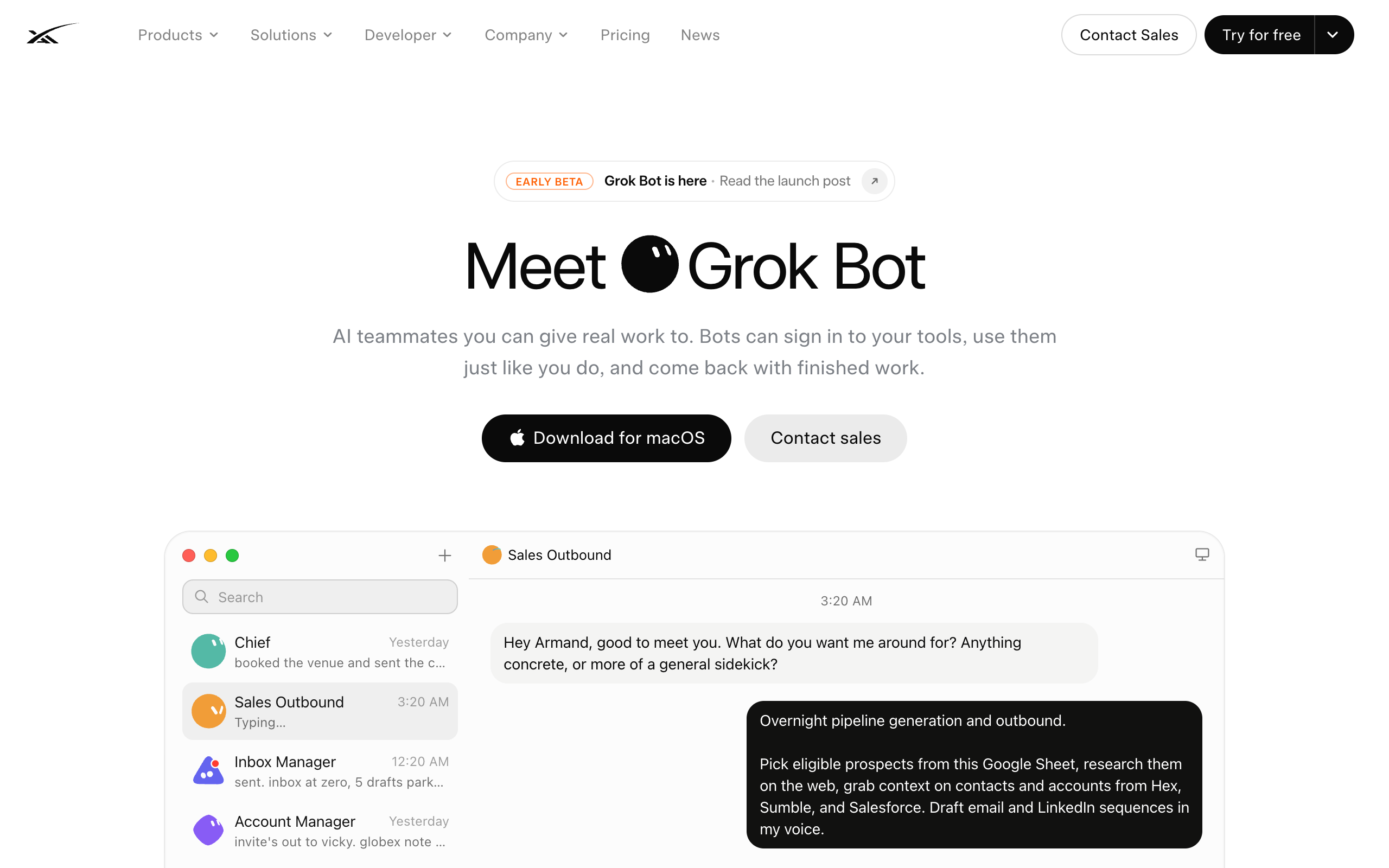
xAI's product page opens on one complete worked example. A bot renamed Sales Outbound is told to pick eligible prospects from a Google Sheet, research them on the web, pull context from the connected CRM and data tools, and draft email and LinkedIn sequences in the owner's voice. It reports 52 accounts pulled and 36 drafts queued, with zero sent. The demo's own text: "Nothing goes out until you've had a look." The owner approves the top ten and turns the job into a weekly routine named Overnight outbound.
Behind the demo, xAI publishes a gallery of 56 example roles across nine functions. The gallery is covered in detail in Grok Bot use cases, and the Grok Bot directory lists every role in it. The rest of this page covers what users, rather than the vendor, have built.
Example 1: a 15-bot business fleet
The most detailed published setup is Brandon Charleson's fleet: a business owner running about fifteen named bots, most named after Disney and Pixar characters. He did not design the roster by hand. He asked Eve, his first bot and "Chief of AI Staff," how to run the business lean, and approved the role list she proposed.
The named roles, as described on camera:
- Eve, Chief of AI Staff. Briefed on the whole business. All delegation and daily roll-ups run through her. His rule: "your first agent should be an extension of literally you."
- Postmaster, inbox monitor. Connected to every inbox he actively watches. Classifies each message: spam, invoice, receipt, action needed.
- Talia, CFO bot. Tracks invoices and audits subscriptions with the question "are you actually using it?"
- The other twelve: Roz (outbound), Marlow (paid media), Luma (content, trained on his posts and video transcripts), Scout (competitive intelligence), Optimus (cross-internet signals), Packed (partnerships and call review), Pulse (pipeline status), Baymax (calendar-booking outbound), Amara (client delivery), Edna (people ops), Yard (fleet ops and spend), Forge (engineering: PR triage and bugs).
Two details are worth copying. First, the bots verify each other's work: Postmaster spots a money event, such as a Stripe receipt, and hands it to Talia, who checks it against the bank statement, flags anything unused or suspicious, and asks the owner to keep or cut. Second, the rules are written, not assumed: "nothing leaves or gets published without human review. That is a hard blocker," and no money moves without review. Every bot files an end-of-day roll-up, so the owner reads one digest instead of fifteen threads.
The operating rules behind this setup are covered in Grok Bot best practices.
Example 2: a creator's five research bots
Peter Yang built five bots on camera. The first bot designed the others: he briefed an Advisor bot on his work and family, asked it to propose five useful bots, then had the Advisor build the first one directly.
The five bots and what each produces:
- YouTube Researcher. Monitors named channels in his niche. Delivers a morning brief: three content ideas, the five biggest outlier videos from the last 14 days, top performers, and recurring themes from his own comments. His first version was "verbose and hard to follow"; he fixed it by dictating the exact format.
- X Scout. A weekly top ten of posts from accounts he follows, engages with, or bookmarks, grouped by theme with full copy, links, and analysis, ending with three post ideas. It created its own daily routine without being asked.
- Digital Marie Kondo. Audits Gmail, Drive, and recurring receipts into a cleanup plan capped at ten items per category, sorted into "safe to clean up," "needs review," and "do not touch." It is instructed never to delete, unsubscribe, or cancel anything itself.
- Personal Concierge. Reads his trip document, watches flights and hotels for the whole itinerary, and alerts him on meaningfully better deals. Booking stays with him.
- A gamer bot, pointed at Doom and Red Alert, which demonstrates that the bot operates a real computer.
His prompts for all five, including the approval clauses, are pinned under the video.
Example 3: twelve bots with one chief of staff
Nate B Jones ran over a dozen bots in his first week. His design rule: build each bot around a theme, "not an agent for one run or one task, but an agent around a theme." His documented bots:
- Chief of Staff. Coordinates the rest. Used for jobs like finding the root cause of issues appearing across several conversations.
- A landing-page bot. Exists only to work on one project's landing pages, accumulating context on that one artifact.
- A schedule optimizer. Finds calendar windows for appointments that never fit, such as a dental visit.
- A city-networking bot. Before travel, it finds people worth meeting in the destination city, using contacts already in his inbox, and drafts the outreach.
Jones also states the failure mode he built the last one to avoid: an email bot with no goal. "The classic email organizer bot... there was no goal to it. Where's the value?"
Example 4: single-bot setups
Three walkthroughs show the smallest working version: one bot, one job.
- Paul J Lipsky built Atlas, a travel bot, from one description: compare itineraries to Italy, Greece, and the UK around Thanksgiving, then watch fares and hotels. The bot asked clarifying questions, named itself Atlas, and created its own watching routine. His second bot, Lincoln, researches companies on LinkedIn in its own browser; the owner types the password during a screen take-over, so the bot never holds the credential.
- Riley Brown built an EA bot for email and calendar whose first routine was a 9 a.m. digest across Linear, Slack, email, and calendar, with sponsorship emails prioritized. His content agent scrapes his Instagram and video transcripts to draft in his voice, and his developer agent built a landing page and served it from the bot's own computer, controllable from his phone.
- A commenter on Alex Finn's walkthrough runs a chief-of-staff bot that coordinates projects "with GitHub in the middle," tracking conversations as GitHub issues, with Cursor as the coding agent.
Example 5: an X posting team and shared community setups
Clearmud's setup is a three-bot team for growing his X account: an X researcher, an X creative that was given reference infographics to match, and an X drafter, each with its own routine. His testing surfaced a current limit: bots in one group thread could not save routines, and he created those by hand. He also built an Elon Musk persona bot pointed at the public record, for fun.
The same video shows setups shared publicly by others:
- Developer advocate Debbie O'Brien's chief-of-staff prompt, which asks the bot to review the owner, the existing bots, and propose changes.
- A function map by a marketer, Shan: SEO bot, content bot, PR bot, paid bot, CRO bot, and outbound bot.
- Ben Lang's consumer list: booking flights, ordering groceries from recipe photos, fixing GPS metadata on hundreds of film scans, negotiating contractor quotes, and a prospecting plan that edits a Google Sheet as it goes.
Full list of named bots, with sources
Every row traces to the linked demo or thread.
| Bot | Owner and source | Set up to do | Produced |
|---|---|---|---|
| Sales Outbound | xAI launch demo | Prospect research from a Google Sheet, CRM context | 36 queued drafts, 0 sent; a weekly routine |
| Eve, Chief of AI Staff | Charleson | Coordinate the whole business | The 15-role fleet design; daily roll-up digests |
| Postmaster | Charleson | Monitor every active inbox | Classified mail; money events routed to Talia |
| Talia, CFO bot | Charleson | Ledger, subscriptions, invoices | Bank-verified receipts; keep-or-cut subscription flags |
| Luma, Scout, Roz, Marlow, Optimus, Packed, Pulse, Baymax, Amara, Edna, Yard, Forge | Charleson | Content, competitive intel, outbound, ads, signals, partnerships, pipeline, booking, delivery, people ops, spend, engineering | Role-by-role walkthrough on camera |
| Advisor | Peter Yang | Propose and build other bots | Five proposed bots; built the researcher itself |
| YouTube Researcher | Peter Yang | Monitor named channels and his comments | Daily brief: 3 ideas, 5 outliers, comment themes |
| X Scout | Peter Yang | Watch his timeline and bookmarks | Weekly themed top ten with post ideas |
| Digital Marie Kondo | Peter Yang | Audit Gmail, Drive, receipts | Three-bucket cleanup plan, approval-gated |
| Personal Concierge | Peter Yang | Watch fares against his trip document | Alerts on meaningful fare and hotel drops |
| Chief of Staff | Nate B Jones | Coordinate his other eleven bots | Cross-conversation root-cause summaries |
| Schedule optimizer | Nate B Jones | Scan his calendar | Windows for hard-to-place appointments |
| City-networking bot | Nate B Jones | Find contacts in a destination city | A who-to-meet list with drafted outreach |
| Atlas | Lipsky | Watch three holiday itineraries | Ballpark fares; a self-created watching routine |
| Lincoln | Lipsky | LinkedIn research and outreach | Company research filed to Notion |
| EA bot | Riley Brown | Email, calendar, Linear, Slack | A 9 a.m. cross-tool morning digest |
| Developer agent | Riley Brown | Build from a brief and a screenshot | A live page served from the bot's own computer |
| X researcher, X creative, X drafter | Clearmud | Grow his X account | Independent routines; drafts in his visual style |
| Slate, Build, Cindy | Alex Finn | CEO, coding, email | The delegate-through-one-bot workflow |
The example that does not exist: agency fleets
No published example shows an agency running separate clients on one Grok Bot account. The demand exists: an agency owner with 36 clients asked in one walkthrough's comments for a bot "structurally unable to touch client B's accounts," and a second agency asked the same question under another video. Neither thread has an answer as of 25 August 2026.
The reason is documented. xAI's FAQ states that every bot shares one computer, including files, browser, and logins, and that "isolation is per user, not per Grok Bot." Every published fleet on this page is a one-owner setup because that is what the architecture supports. The full analysis is the Boundary Test.
The same setup with the operation built in
The structure in these examples transfers to other platforms, because it is a role design rather than a product feature: a coordinator, specialist roles, standing routines, and human approval gates.
Squad runs that structure as a hosted squad: a coordinated set of specialist AI agents sharing one task board, not one generalist agent doing everything. Five differences against the examples above:
- The roster is proposed for you. After signup, the lead agent interviews the founder about the business and proposes a named squad, which the founder approves, renames, or edits. The build takes about two minutes, then a short onboarding conversation. In the Grok Bot examples, the owners designed their fleets themselves or asked their first bot to do it.
- The coordination the examples build by hand comes built: a shared task board with queues, a ticketing lane for the calls only the owner can make, a status timeline per agent, a managed document store, and per-run model and token usage. The daily roll-up these fleets script is what the board already shows.
- The approval gates the fleets write into descriptions have a place to land: agents can hold drafts and escalations as cards for sign-off, and each agent can have its own email inbox (a paid add-on), so email is a trigger rather than a scheduled batch.
- The model is the founder's own AI accounts, across thirteen providers including Grok itself, with no token markup. Accounts stack, and an ordered fallback list hands a run to the next model when a run fails or hits a rate limit, so the fleet does not have to wait on a reset clock. The cost is $99/mo flat plus the AI plan, typically $199-299 all in, against Grok Bot's plans from $20 a month with Cursor Pro to $200 with Cursor Ultra, model included.
- For the agency example specifically: each agent has its own browser by default, and every connected account carries an access level that varies by app. Any single agent can get a lower level or no access, changeable without signing in again, and calls outside the level are refused.
How many agents a business needs is a separate question; the Lane Test answers it before anything gets built.
| Scenario | Best pick | Why |
|---|---|---|
| You run a business solo and want the full picture | Copy the 15-bot fleet's structure | Coordinator, specialists, written no-send and no-spend rules, daily roll-ups. Reduce the roster to your needs. |
| You create content for a living | Copy the five research bots | Advisor first, then researcher, scout, and cleaner. The pinned prompts include the approval clauses. |
| You want value from one bot this week | Copy Atlas or the EA bot | One description, one routine: a fare watcher or a 9 a.m. digest. The smallest working example on record. |
| You cannot name the roles you need | Have the first bot design the rest | Two of the documented fleets were proposed by their own chief-of-staff bot after a full briefing. |
| You want your fleet reviewed | Run the self-audit prompt | The shared chief-of-staff prompt reviews the owner and the bots and proposes changes. |
| You are growing one social channel | Copy the three-bot X team | Researcher, creative with reference visuals, drafter. Group-thread routines need manual setup. |
| You run engineering work | The GitHub-in-the-middle setup | Chief of staff coordinating, conversations as issues, a coding agent writing the code. |
| You hold client work that needs separation | Not a Grok Bot fleet | No published example exists, and xAI's per-user isolation is the reason. Use a platform with per-agent permissions. |
These examples fit a founder who learns from working setups: each shows a real owner, a real roster, and the rules that made it workable. Copy the structure first, one coordinator, one role per bot, a routine per job, and drafts instead of sends, then adapt the specific bots.
Frequently asked questions
The examples
What are some real Grok Bot examples? Documented examples include a 15-bot business fleet with named roles such as a CFO bot that audits subscriptions against bank statements and an inbox bot that classifies every incoming message; a creator research desk of five bots including a YouTube researcher and an X scout; a dozen themed bots behind one chief of staff, including a schedule optimizer and a city-networking bot; and single-job bots like a travel scout that watches fares on a routine. Every one traces to a public video or thread.
What is the most detailed Grok Bot example published so far? A 15-bot business fleet in which the bots verify each other's work: the inbox bot spots a Stripe receipt or invoice and checks it with the CFO bot, which verifies it against the bank statement, flags unused subscriptions, and asks the owner whether to keep or cut. The fleet runs under two written rules: nothing publishes without human review, and no money is spent without human review.
Are there Grok Bot examples for personal life, not business? Yes. Documented personal bots include a travel concierge that reads a trip document and watches fares and hotels for better deals, an email cleaner that sorts cleanup into safe, needs-review, and do-not-touch buckets, a subscription auditor, an apartment scout from xAI's own gallery, and a persona bot built for fun. All of them stop before booking, deleting, or cancelling without approval.
Is there a published example of an agency running client work on Grok Bot? No. Agency owners have asked in at least two separate creator threads how to keep one client's accounts structurally away from another's, and neither thread has an answer. xAI's FAQ states isolation is per user rather than per bot, so every published fleet is a one-owner setup.
Copying them
What is the first Grok Bot most people build? A chief of staff. Every published fleet of a dozen or more bots starts with one coordinator bot the owner briefs deeply and pins to the top, and several creators advise building it first. One widely shared prompt has the chief of staff audit the rest of the fleet and propose changes.
Can one Grok Bot create the other bots? Yes. One creator told his advisor bot about his work and asked it to propose five bots, then had the advisor build one of them directly. Another asked his chief-of-staff bot how to run the business lean, approved the proposed role list, and set up the whole 15-bot fleet from it.
How do you copy these examples into your own Grok Bot? Start with the fleet closest to your situation, build its coordinator first, and copy the written rules before the bot list: the published fleets run on no-send and no-spend rules, approval-gated prompts, and iterated report formats. The pattern matters more than the names: one role per bot, a routine per standing job, and outbound work stopping as a draft.
Beyond Grok Bot
Do these examples work outside Grok Bot? Yes, because they are role designs rather than product features: a coordinator, specialist roles, standing routines, and human approval gates run the same way on a hosted squad platform. Squad (formerly MissionControlHQ) runs the same structure at $99 per month flat on your existing AI accounts, with the operation built in: its lead agent proposes the roster for you, work runs on a shared task board with tickets and per-run token usage, agents can hold drafts as cards for sign-off, each agent can have its own email inbox as a paid add-on, and your accounts stack with fallback models across thirteen providers, Grok included.
Sources
- xAI, Grok Bot: the Sales Outbound launch demo quoted here, the 56-role use-case gallery, and the shared-computer FAQ. Fetched 25 August 2026.
- Creator demos on YouTube, each the source for the bots attributed to it: Brandon Charleson (the 15-bot fleet, written rules, and the Postmaster-to-Talia verification chain), Peter Yang (the five research bots and pinned prompts), Nate B Jones (the twelve-bot setup), Paul J Lipsky (Atlas and Lincoln), Riley Brown (EA, content, and developer bots; the 36-client agency comment), Alex Finn (Slate, Build, Cindy; the second agency question and the GitHub-in-the-middle comment), and Clearmud (the X team, the persona bot, and the shared setups by Debbie O'Brien, Shan, and Ben Lang shown on screen). All fetched 25 August 2026.
- Anthropic, The 2026 State of AI Agents Report: the 57% multi-stage figure. Fetched 19 August 2026.
- Squad: get started, for the lead-agent squad design, per-agent connection permissions, provider list, and the $99/mo single plan; docs: add, change, and pause agents for the status timeline per agent.
- Related on this site: Grok Bot pricing, the Grok Bot directory, Grok Bot use cases, Grok Bot best practices, Grok Bot alternatives and the Boundary Test, use cases for AI agents, and a team of AI employees.
Last updated: September 2026. Grok Bot pricing checked on cursor.com and x.ai on 14 September 2026; other xAI and creator sources fetched 25 August 2026.