
Grok Bot costs $20 a month at the cheapest, through Cursor Pro. It has no price of its own: it comes bundled with Cursor and SuperGrok plans, and each plan grants a weekly Grok Bot allowance.
On August 26, 2026, xAI made Grok Bot "available for SuperGrok, Cursor Pro, and all Cursor Teams plans." This page lists every plan that includes Grok Bot, its monthly price, what happens when usage runs out, and the costs that are easy to miss. Prices were checked on cursor.com and x.ai on September 14, 2026.
$20
per month for Cursor Pro, the cheapest plan that includes Grok Bot. The cheapest xAI plan that includes it is SuperGrok at $30 a month.
Source: Cursor pricing and xAI pricing, checked September 14, 2026iShort answer
Grok Bot pricing starts at $20 a month with Cursor Pro. It is also included with Cursor Pro+ ($60), Cursor Ultra ($200), Cursor Teams seats ($40 or $120 per user), and linked SuperGrok ($30), SuperGrok Plus ($100), SuperGrok Heavy, and X Premium+ subscriptions. There is no standalone plan and no free plan, only a one-time free trial credit. Usage resets weekly; when it runs out, Grok Bot stops or continues as on-demand usage, and plans do not stack.
Key takeaways
| Question | Answer |
|---|---|
| Cheapest plan with Grok Bot | Cursor Pro, $20 a month |
| Cheapest xAI plan with Grok Bot | SuperGrok, $30 a month |
| Most included usage | Cursor Ultra ($200 a month) or a linked SuperGrok Heavy subscription |
| Standalone Grok Bot plan | None. Access comes with a Cursor plan or a linked SuperGrok or X Premium+ subscription |
| Free option | A one-time free trial: a usage credit with a 7-day window |
| When usage runs out | Grok Bot stops until the weekly reset, or continues as on-demand usage if you turn that on |
| Plans stack | No. A Cursor plan and a SuperGrok link do not add usage together |
Grok Bot pricing at a glance
Grok Bot is included with nine plans. Individual plans with a published price run from $20 to $200 a month. The table lists each plan's monthly price and its Grok Bot usage level, as Cursor's help center describes it.
| Plan | Monthly price | Grok Bot usage | Sold by |
|---|---|---|---|
| Cursor Pro | $20 | Weekly usage, below Pro+ | Cursor |
| SuperGrok (linked) | $30 | Linked usage, below Plus | xAI |
| Cursor Teams Standard | $40 per user | Follows the Teams seat allowance | Cursor |
| Cursor Pro+ | $60 | Generous weekly usage, below Ultra | Cursor |
| SuperGrok Plus (linked) | $100 | Generous linked usage, below Heavy | xAI |
| Cursor Teams Premium | $120 per user | 5x the usage of a Standard seat | Cursor |
| Cursor Ultra | $200 | Highest weekly usage | Cursor |
| SuperGrok Heavy (linked) | Not listed on x.ai's public pricing page | Highest linked usage | xAI |
| X Premium+ (linked) | Price set by X | Linked usage, below SuperGrok Plus | X |
Neither Cursor nor xAI publishes Grok Bot usage as a number of tasks or hours. Each plan's allowance is described only relative to the others.
Which plans include Grok Bot
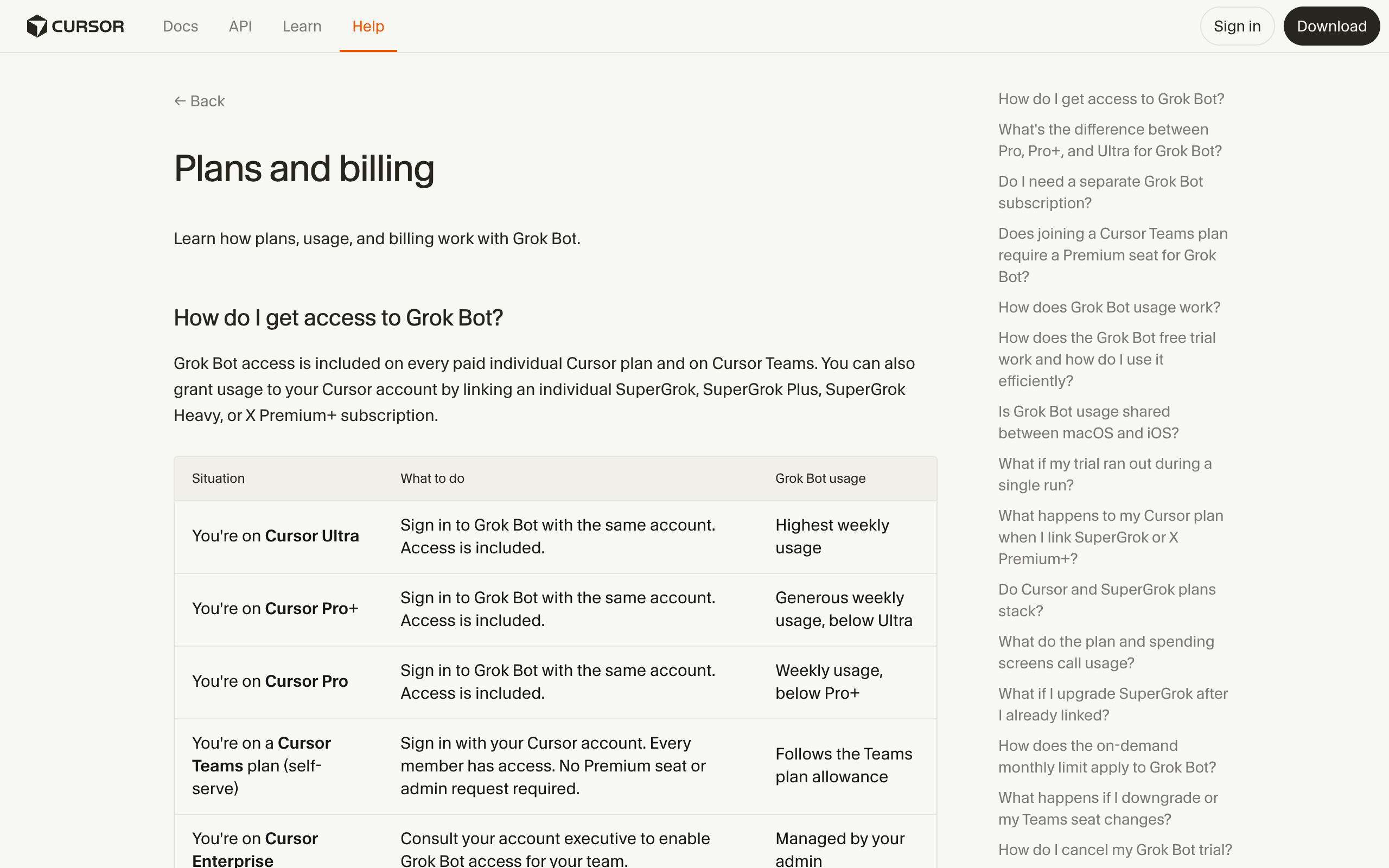
Grok Bot is included with every paid individual Cursor plan, every Cursor Teams seat, and four linked xAI or X subscriptions. You do not buy Grok Bot on its own. Cursor's help center answers the question directly: "Do I need a separate Grok Bot subscription? No."
Cursor plans. Sign in to Grok Bot with your Cursor account and access is included.
- Cursor Pro, $20 a month. The cheapest plan with Grok Bot.
- Cursor Pro+, $60 a month. More Grok Bot usage than Pro.
- Cursor Ultra, $200 a month. The highest weekly Grok Bot usage of the Cursor plans.
Cursor Teams. Every member of a Teams plan has Grok Bot, and usage follows the seat's allowance. A Standard seat costs $40 per user per month, and a Premium seat costs $120 per user per month with 5x the usage of a Standard seat. Cursor bills per active paid seat.
Linked xAI and X subscriptions. You can grant Grok Bot usage to your Cursor account by linking an individual SuperGrok, SuperGrok Plus, SuperGrok Heavy, or X Premium+ subscription. SuperGrok costs $30 a month and lists "Grok Bot access" on x.ai's pricing page. SuperGrok Plus costs $100 a month.
Enterprise. Cursor Enterprise customers get Grok Bot through their Cursor account team.
Plans that do not include Grok Bot: SuperGrok Lite, according to Cursor's help center. The free Grok plan on x.ai's pricing page does not list Grok Bot access.
Grok Bot usage limits and what happens at 100%
Every plan includes Grok Bot usage that resets weekly. When the weekly allowance runs out, Grok Bot either stops or keeps working as paid on-demand usage, depending on one setting.
- On-demand off. Cursor's help center says "Grok Bot stops when weekly usage runs out." The app shows that you have reached your Grok Bot usage limit, and usage returns at the weekly reset.
- On-demand on. Work continues past the weekly allowance and bills as extra usage through Cursor. For Cursor Teams, on-demand usage is enabled by default.
- Monthly on-demand limit. You can set one, but Cursor says it "is not a hard stop in the middle of a run. A bot already working can finish past the monthly limit."
xAI does not publish a separate per-task or per-hour rate for Grok Bot's extra usage. xAI's documentation also says "A separate Grok Bot spend cap is not available today." Account-level on-demand controls apply instead.
Grok Bot usage is separate from your other usage. xAI's announcement says Grok Bot comes with its own usage, separate from your Grok and Cursor usage.
Is Grok Bot free?
Grok Bot is not free, but it has a one-time free trial. The trial is "a usage credit rather than a set number of days, though a 7-day window also applies," according to Cursor's help center.
- The credit is drawn down by how much work your bots do.
- The trial never turns into a paid plan, and used credit is not restored.
- SuperGrok Lite does not include Grok Bot, and the free Grok plan does not list it.
Cursor offers yearly billing on its pricing page. No student or promotional discount for Grok Bot was listed on the pages checked.
The cheapest way to get Grok Bot
The cheapest way to get Grok Bot is Cursor Pro at $20 a month. The cheapest way through xAI is SuperGrok at $30 a month.
| If you already pay for | Your cheapest Grok Bot route | Extra monthly cost |
|---|---|---|
| Nothing | Cursor Pro | $20 |
| Cursor Pro, Pro+, or Ultra | Sign in with your Cursor account | $0 |
| A Cursor Teams seat | Sign in with your Teams account | $0 |
| SuperGrok, SuperGrok Plus, or SuperGrok Heavy | Link it to a Cursor account | $0 |
| X Premium+ | Link it to a Cursor account | $0 |
| SuperGrok Lite | Upgrade to SuperGrok and link it | The difference between your Lite price and $30 |
Upgrading adds usage, linking a second plan does not. Cursor says "A Cursor plan and a SuperGrok or X Premium+ link do not stack." Moving from Cursor Pro+ to Ultra raises included Grok Bot usage to the Ultra tier.
Hidden costs to plan for
The plan price is not always the full Grok Bot bill. Four costs are easy to miss.
- On-demand usage. Once weekly usage runs out, on-demand usage bills extra. It is on by default for Cursor Teams.
- No Grok Bot spend cap. You cannot cap Grok Bot spending separately from other on-demand usage on the account.
- Monthly limits finish the run. A bot already working can finish past your monthly on-demand limit.
- A second plan buys nothing. Paying for both a Cursor plan and a SuperGrok subscription does not add Grok Bot usage. Only upgrading within one plan family does.
Heavy users should compare the price of a higher tier against expected on-demand charges. For example, Cursor Ultra costs $140 a month more than Cursor Pro+, or $1,680 more per year.
Which plan to pick
| Scenario | Best pick | Why |
|---|---|---|
| Trying Grok Bot for the first time | Free trial | A one-time usage credit costs nothing |
| A few personal bots, no Cursor plan yet | Cursor Pro, $20 | The cheapest paid plan with Grok Bot |
| You already pay for SuperGrok | Link SuperGrok | Grok Bot usage at no extra cost |
| You already pay for Cursor | Sign in with Cursor | Access is included with every paid Cursor plan |
| Bots hit the weekly limit every week | Upgrade the tier | A second plan does not stack; a higher tier adds usage |
| A team of developers | Cursor Teams seats | Every member gets Grok Bot, billed per active seat |
| Heavy daily Grok Bot use | Cursor Ultra, $200 | The highest weekly usage of the Cursor plans |
| Strict monthly budget | Turn on-demand off | Grok Bot stops at the weekly limit instead of billing extra |
Grok Bot pricing vs Squad
Grok Bot is the cheaper way to start, and a squad platform costs more but runs on the AI plan you choose. The difference is what the price includes.
Squad (formerly MissionControlHQ) costs $99 a month plus the AI plan you bring, with no per-task AI charges. Squad recommends ChatGPT at $100 to $200 a month, so a typical setup costs $199 to $299 a month in total. A squad is a team of AI agents where each agent owns one job, instead of one agent doing everything.
| Grok Bot | Squad | |
|---|---|---|
| Entry price | $20/month (Cursor Pro) | $99/month plus your AI plan |
| Typical monthly total | $20-200, plus any on-demand usage | $199-299 with the recommended ChatGPT plan |
| AI model | Bundled with the Cursor or xAI plan | Your own AI account, across 13 providers, including Grok through a SuperGrok or X Premium sign-in |
| When usage runs out | Stops until the weekly reset, or bills on-demand usage | Several accounts per provider back one squad, and an ordered list of fallback models picks up the run |
| Spend caps | No separate Grok Bot spend cap | Hard caps on email sends and credit auto-recharge |
Squad facts come from the Squad homepage and the AI accounts, Connect your AI, and What it costs docs. For a full comparison of what each product does, see Grok Bot alternatives.
When Grok Bot alone is enough
Grok Bot alone is enough if you already pay for a Cursor or SuperGrok plan and want a few bots for personal work. The added cost is zero, and the weekly allowance covers light use.
It is also the cheapest way to try AI agents that work on their own computer, at $20 a month or the free trial. Grok Bot's use cases and best practices pages cover what it does well. The Grok Bot directory lists all 56 roles in xAI's gallery, and Grok Bot examples documents more than 30 bots users have built.
A squad platform makes sense when your agents must keep running past a weekly limit, when you want to choose the model for each job, or when several agents need caps and a shared board.
Frequently asked questions
Plans and prices
How much does Grok Bot cost? Grok Bot has no standalone price. It is included with Cursor Pro at $20 a month, Cursor Pro+ at $60, Cursor Ultra at $200, Cursor Teams seats at $40 or $120 per user per month, and with a linked SuperGrok ($30 a month), SuperGrok Plus ($100 a month), SuperGrok Heavy, or X Premium+ subscription. Prices checked on cursor.com and x.ai on September 14, 2026.
What is the cheapest way to get Grok Bot? Cursor Pro at $20 a month is the cheapest paid plan that includes Grok Bot. SuperGrok at $30 a month is the cheapest xAI plan that includes it. Grok Bot also offers a one-time free trial, which is a usage credit with a 7-day window.
Is Grok Bot free? No. SuperGrok Lite does not include Grok Bot, and x.ai's pricing page does not list Grok Bot on the free Grok plan. Grok Bot has a one-time free trial: a usage credit rather than a set number of days, though a 7-day window also applies. The trial never turns into a paid plan.
Do I need a separate Grok Bot subscription? No. Cursor's help center says access is included with Cursor Pro, Cursor Pro+, Cursor Ultra, or a Cursor Teams seat, or by linking a SuperGrok, SuperGrok Plus, SuperGrok Heavy, or X Premium+ subscription to your Cursor account.
Usage and limits
What happens when Grok Bot usage runs out? Each plan includes Grok Bot usage that resets weekly. If on-demand usage is off, Grok Bot stops when weekly usage runs out and resets with weekly usage. If on-demand usage is on, work continues and bills as extra usage. A monthly on-demand limit is not a hard stop in the middle of a run: a bot already working can finish past it.
Do Cursor and SuperGrok plans stack for Grok Bot? No. Cursor's help center says a Cursor plan and a SuperGrok or X Premium+ link do not stack, so they do not add Grok Bot usage on top of each other. To get more included usage, upgrade within Cursor plans, for example from Pro+ to Ultra.
Can I set a spending cap for Grok Bot? Not for Grok Bot alone. xAI's documentation says a separate Grok Bot spend cap is not available today. Account-level on-demand controls apply, and the dashboard usage page shows the per-product split.
Alternatives
Is there a cheaper alternative to Grok Bot? Grok Bot is already cheap to start at $20 a month if you want a few bots on xAI's plan. A squad platform costs more but runs on the AI plan you choose. Squad (formerly MissionControlHQ) is $99 a month plus the AI plan you bring, with no per-task AI charges; it recommends ChatGPT at $100 to $200 a month, and it also connects a SuperGrok or X Premium subscription.
Sources
- Cursor, Pricing: Pro $20, Pro+ $60, Ultra $200, Teams $40 per user, and yearly billing. Checked September 14, 2026.
- Cursor Help Center, Grok Bot plans: included plans, relative usage levels, linking, stacking, on-demand usage, and the free trial.
- Cursor Docs, Teams pricing: Standard and Premium seats, active-seat billing, and on-demand defaults.
- xAI, Pricing: SuperGrok $30 with Grok Bot access and SuperGrok Plus $100.
- xAI, Grok Bot is now included with more plans (August 26, 2026).
- xAI Docs, Grok Bot for teams and enterprises: availability and the spend cap answer.
- Squad: the homepage pricing and FAQ, and the docs pages AI accounts and models, Connect your AI, and What it costs.
- Related on this site: Grok Bot alternatives, Grok Bot use cases, Grok Bot best practices, Grok Bot examples, the Grok Bot directory, and AI agent cost control.
Last updated: September 2026. Pricing and features verified as of September 14, 2026.