
An AI agent for customer support can take over the repeat questions in a small business inbox today. Refunds and exceptions should stay on approval. Angry customers, legal threats, and your biggest accounts should stay with you.
Most advice on this topic assumes a call center with dozens of agents. A small business has one shared inbox, one or two people, and a customer who may know the owner by name. A wrong reply costs more here, and the savings come from a smaller pile.
64%
of customers said they would prefer that companies did not use AI in customer service. 53% said they would consider switching to a competitor if they learned a company planned to. Gartner surveyed 5,728 customers in December 2023.
Source: Gartner survey, reported by Insurance-Canada.ca, 15 July 2024iShort answer
Hand off sorting and repeat questions first, and keep money and risk on your desk. Buy a dedicated support product such as Intercom Fin, Zendesk AI, Gorgias, Tidio, or Help Scout if customers expect instant answers on chat, or if support is your main problem. Choose Squad (formerly MissionControlHQ) when support is one of several recurring jobs and you want them run in one place.
Key takeaways
| The question | The answer |
|---|---|
| What can a small business hand off? | Inbox sorting, repeat questions, and first drafts |
| What needs approval? | Refunds, credits, policy exceptions, and any new type of reply |
| What stays with the owner? | Angry customers, legal threats, safety issues, and your largest accounts |
| What do dedicated tools charge? | $0.75-2.00 per resolved conversation on top of seats or a plan, as of 2 November 2026 |
| When is a dedicated tool the right buy? | When customers expect live answers, or support is your main workload |
| When does Squad fit? | When support sits alongside invoices, reports, and other recurring jobs |
Sort by what a wrong answer would cost.
Agent drafts
Repeat questions with a written answer. Sends on its own only after you check that reply type.
You approve
Refunds, credits, exceptions, and anything the agent has not handled before.
You keep
Angry customers, legal threats, safety issues, and your largest accounts.
What goes wrong with AI customer support
Five problems push small businesses to look twice before they buy. Each one comes from a survey, a vendor's own help page, or public reviews.
- Customers are wary of it. In a Gartner survey, 64% of customers said they would prefer that companies did not use AI in customer service.
- The bill rises with volume. Zendesk charges $2.00 per automated resolution on pay-as-you-go, so a busy month costs more than a quiet one.
- A resolution may not mean a solved problem. Intercom's help page counts a conversation when the customer leaves without asking for more help, and that customer may have given up.
- The AI can answer badly. Trustpilot reviews of Gorgias include complaints about incorrect AI replies and tickets closed without answers.
- Customers can get stuck with the AI. Trustpilot reviews of Tidio include complaints about reaching a person.
Trustpilot says it does not verify the claims in reviews, so treat these as questions to ask a vendor. The rest of this page shows how to limit each problem.
Which type of tool solves which problem
Four types of tool cover small business support, and each one answers a different problem from the list.
| Type of tool | Examples | What it does | Problem it helps with |
|---|---|---|---|
| AI chat agent | Intercom Fin, Tidio Lyro | Answers customers on your site within seconds | Customers who wait, and a small team at night |
| Help desk with AI | Zendesk AI, Gorgias | Adds AI answers to a ticket system | Ticket volume, and a team already in the help desk |
| Shared inbox with AI drafts | Help Scout Plus | Writes a draft for a person to read and send | Wrong answers, because a person checks each one |
| AI teammates across your apps | Squad | Sorts, drafts, and reports across your inbox and help desk | Support that sits beside other recurring jobs |
Which replies to hand off
Sort each message by what a wrong answer would cost you. A wrong answer about opening hours costs a follow-up. A wrong answer about a refund costs money. A wrong answer to a legal threat can cost far more.
| Message | Who handles it | Why |
|---|---|---|
| Opening hours, delivery areas, pricing questions | Agent drafts, then sends once you trust it | The answer is written down and rarely changes |
| "How do I" product questions | Agent drafts, then sends once you trust it | The answer sits in your help docs |
| Spam, sales pitches, and duplicates | Agent sorts | No customer is waiting |
| Booking or appointment changes | Agent drafts, you check at first | Mistakes are small but visible |
| Refunds inside your policy | Agent drafts, you approve | Money moves |
| Refunds outside your policy, credits, and discounts | You approve each one | You are setting a precedent |
| A complaint about a mistake you made | Agent drafts, you edit and send | Tone matters more than speed |
| Angry customers and your largest accounts | You reply | A personal reply protects the account |
| Legal threats, chargebacks, safety, and health issues | You reply | The wording can bind you |
This sorting uses the same line as the Fetch Test. If the answer already exists in your docs or policy, an agent can own it. If the answer depends on a judgment about the customer, it stays with you.
Before you automate anything, run the job through the filter in use cases for AI agents. Support passes easily: it recurs, a new message triggers it, and the reply is an artifact you can check.
The Gartner survey sets the second rule. Customers worry about AI in service, so always give them a clear way to reach a person.
How to automate customer support with AI
To automate customer support with AI, start with your own messages and work up to automatic sends. These steps apply to any tool on this page.
- Export 50-100 recent customer messages, and sort them by type.
- Write down your answers, your refund rules, and your tone.
- Mark which types sit in each row of the table above.
- Connect one inbox or help desk at the lowest access level that does the job.
- Run the agent on drafts for a week, and correct every miss.
- Let it send one checked reply type at a time.
- Read a sample of sent replies every week.
The first two steps take longer than the setup, and they decide the result. An agent with no written refund rule has to guess.
What to write down before you connect an agent
Write down four things before you connect any tool: your answers, your refund rule, your tone, and the messages you want to keep. An agent can only follow what you give it, so this list decides how many drafts you have to fix.
Start with the 10 questions you answer most often, and write the answer you would want a new hire to give. Then write the refund rule with numbers in it. "Refund any order under $50 within 30 days" gives an agent a rule to check. "Be fair about refunds" does not.
Squad's delegation guide splits a good brief into five parts. The same parts work for a support brief in any tool. The example below is for a small business, so swap in your own numbers.
| Part | What to write | Support example |
|---|---|---|
| Goal | One sentence on the result | "Clear the overnight support inbox before 9am." |
| Context | Who it is for, and which docs to read | "Customers of a local bakery. Use the Answers doc and the Refund doc." |
| Constraints | Voice, limits, and what the agent must not do | "Short and warm. Never promise a delivery date." |
| Decisions | Which calls come back to you | "Ask me before any refund, credit, or discount." |
| Done looks like | The output, where it goes, and its state | "Drafts ready for my review, and a list of what needs me." |
Rules you repeat every week should sit where the agent reads them every time. In Squad, that place is an inbox's handling instructions, which Squad gives the teammate each time it reads an email. Here is a first version, built on the briefing in Squad's docs.
Handle: opening hours, delivery areas, and order questions.
Draft for my review: every reply to a customer, and anything about money.
Escalate, do not reply: angry customers, legal threats, and health issues.
Tone: short and warm. Sign off as Sam.
If you are not sure an email is yours, it is not. Escalate it.
Handling instructions are a briefing, and Squad does not enforce them. The section on approvals and escalation lists the settings that do. For more on where a person should step in, see human-in-the-loop AI agents.
How triage and drafts work in each app
An agent's access depends on the app, so check each one before you plan your workflow. The notes below come from Squad's integration manuals, which list what teammates can do at each level. A teammate is Squad's word for one AI agent with a job.
| App | Levels | What a teammate can do | What to watch |
|---|---|---|---|
| Gmail | Read-only, Read + send, Full access | Read mail, write drafts, reply, and forward | Labels and archiving need Full access |
| Zendesk | Read-only, Read + write, Full access | Create, update, reply to, and merge tickets | Read + write also allows ticket deletes |
| Intercom | Read-only, Read + write, Full access | Reply to, assign, and close conversations | Publishing help articles needs Full access |
| Gorgias | One level, Default | View, create, update, tag, and delete tickets | The manual lists no separate reply action |
Gmail
Gmail has no draft-only level. Read + send lets a teammate write a draft, and it also lets the teammate send email, reply, and forward. If you want drafts and no sends, that is an instruction to the teammate, and the access level will not enforce it.
Sorting has a catch too. Labels, archiving, and trash all need Full access, which also allows permanent deletes. For a cautious start, keep Gmail at Read-only and ask the teammate to write a morning summary of what needs you. Move up when you have seen a week of good work.
A trigger can wake a teammate when a new email arrives in Gmail. A trigger that a teammate suggests does nothing until you approve it, and each trigger runs at most 100 times a day by default.
Zendesk
Zendesk's recommended level is Read + write. A teammate can read tickets, tag them, merge duplicates, and reply by adding a comment. Macros, triggers, and views stay out of reach until Full access, so your help desk setup stays as you built it.
A reply to a ticket can reach the customer. If you want to read it first, tell the teammate to bring you the draft as a question before it replies.
Intercom
Intercom's recommended level is Read + write. A teammate can reply to, assign, and close conversations, and it can reply to a ticket with a note for admins. That note gives you a way to review a draft inside Intercom. A teammate works on conversations in the inbox, so instant answers on your site still need Fin or another chat product.
Gorgias
Gorgias has one level, and teammates can use all 32 actions, including ticket deletes. You can block a single teammate with No access, but you cannot narrow the level. The manual lists actions for tickets, tags, customers, and teams, with no separate action for sending a reply.
Use a Squad teammate on Gorgias for sorting, tagging, and pattern reports. Keep customer replies in Gorgias's own tools or ask the teammate to prepare the draft for you. Squad has no Shopify integration, so a teammate cannot look up an order there.
Approvals and escalation
Approval is a habit you set up, and you should know which parts a tool enforces. In Squad, teammates can draft for your approval and open a question before money moves; set access levels and send caps for anything that must not happen.
Squad has no draft-only setting. Draft-first is an instruction, and a teammate can send directly. Write your rules into the inbox's handling instructions and into About you, which teammates read at the start of every run.
| What you want | How to set it up in Squad | Enforced by a setting? |
|---|---|---|
| Keep a teammate out of an app | No access, under One teammate at a time | Yes |
| Limit what a teammate can do in an app | A lower access level | Yes, and levels vary by app |
| Limit email sent from a teammate's inbox | Daily send cap, set low at first | Yes |
| Read a draft before it sends | Tell the teammate to draft first | No, it is an instruction |
| Get asked before a refund | Tell the teammate to open a question | No, it is an instruction |
| Block refunds outright | Keep Stripe at Read-only | Yes |
Refunds show why this matters. Stripe at Read + write allows a teammate to create a refund. If a teammate only needs to look up a charge, Read-only removes the risk.
Drafts from a Squad inbox wait in Email and in Needs you. You can approve and send, edit, revise with the teammate, or discard. When a teammate escalates an email, it appears in Needs you with the reason. You tell the teammate what to do, or you dismiss it.
A question blocks the task until you answer. Squad does not undo actions in your connected apps, and sent email cannot be recalled. Read History each week to see what each teammate did.
What to look for in an AI customer support tool
Check six things before you buy an AI customer support tool. The first two decide which products stay on your list, and the rest decide how much you can trust the one you pick.
- Channels. Find out where your customers write to you, then check the tool answers there. Fin lists live chat, email, SMS, WhatsApp, and social channels. Squad works in connected apps such as Gmail and has no live website chat.
- Billing unit. Some tools bill per seat, some per ticket, and some per resolved conversation. Work out your monthly bill at your real volume, then again at double that volume.
- How a resolution counts. Read the vendor's definition. Intercom counts a customer who leaves without asking for more help, and Zendesk uses a large language model to confirm the issue was solved.
- The path to a person. Customers need a clear way out of the AI. Check how a handoff works, and whether you pay for it. Intercom does not charge for a handoff to a person.
- Enforced limits. Ask which limits are settings and which are instructions. A spending cap on Help Scout's Envoy and a daily send cap on a Squad inbox are settings. An instruction to draft first is only an instruction.
- A real trial. Use the trial on your own messages. Help Scout offers 15 days, Intercom and Zendesk offer 14, and Gorgias and Tidio offer 7. Squad has no free trial, and it has a 7-day money-back guarantee on the first payment.
How the tools were evaluated
The tools on this page were compared on the six criteria above. These five products cover the main ways a small business buys AI support: a chat widget, a ticket help desk, an ecommerce help desk, a low-cost chat tool, and a shared inbox.
Prices, trials, and limits come from each vendor's own pricing and help pages, as of 2 November 2026. Ratings come from Trustpilot and the Shopify App Store, each with its review count. Squad's details come from its homepage, its docs, and its integration manuals.
AI customer support tools and prices
The main AI customer support tools charge for seats or a plan, then add a fee per resolved conversation. Prices are as of 2 November 2026, from each vendor's own pages. All of these tools answer customers directly, which Squad does not do on a website.
| Tool | Best for | Base price | AI price | Trial |
|---|---|---|---|---|
| Intercom Fin | Businesses with a busy chat widget | $29 a seat yearly, $39 monthly (Essential) | $0.99 per outcome | 14 days |
| Zendesk AI | Teams already on Zendesk | $19 an agent yearly, $25 monthly (Support Team) | 5 resolutions per agent included, then $2.00 each pay-as-you-go | 14 days |
| Gorgias | Online stores | $50 a month yearly, $60 monthly (Basic, 300 tickets) | AI Agent adds $27 a month yearly or $30 monthly for 30 interactions, then $1.50 each | 7 days |
| Tidio | Small sites that want a low entry price | Free for 50 conversations, Starter $24.17 a month | Lyro from $32.50 a month for 50 conversations | 7 days |
| Help Scout | Teams that want AI drafts on a shared inbox | $25-75 a user yearly, $30-90 monthly | Envoy at $0.75 per resolution | 15 days |
Intercom Fin
Fin is Intercom's AI agent. It answers customers on live chat, email, SMS, WhatsApp, and social channels, and it can also run on other help desks such as Salesforce, HubSpot, Front, and Gorgias.
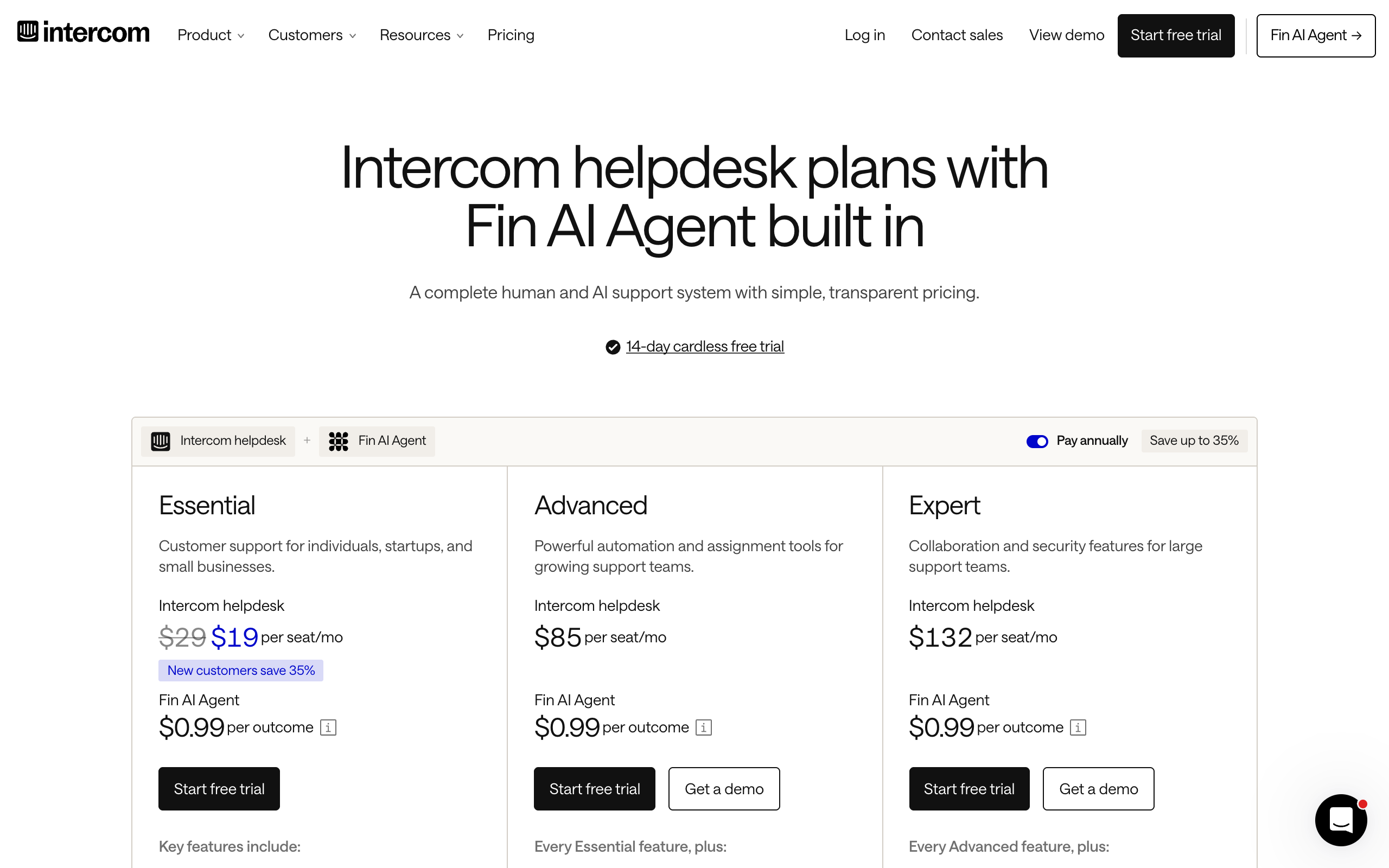
Fin is a strong choice if your customers talk to you in a chat widget. It costs $0.99 per outcome, on top of Intercom seats. Fin can also run on another help desk, where the pricing page lists a $49 monthly minimum that includes 50 outcomes.
Read how Intercom counts an outcome. A conversation counts when the customer confirms the answer helped, or leaves without asking for more help. A customer who gives up may count as a resolution. Handing off to a person is not charged.
Intercom's pricing page also shows a new-customer offer of $19 a seat on Essential. Its Copilot add-on costs $29 per agent a month billed yearly.
Pros
- Answers on chat, email, SMS, WhatsApp, and social channels
- You pay nothing when Fin hands a customer to a person
- Runs on other help desks, so you can keep the one you have
- A 14-day free trial with no card
Cons
- You pay for outcomes on top of Intercom seats
- A customer who gives up may count as a paid outcome
- Fin Voice has custom pricing through sales
Pricing: Essential is $29 a seat yearly or $39 monthly, plus $0.99 per outcome. See Intercom pricing and Fin pricing.
Businesses with a busy chat widget that want to pay only for outcomes.
Zendesk AI
Zendesk is a help desk built around email and ticketing, and Zendesk AI adds AI agents to it. It suits a team that already runs on tickets.
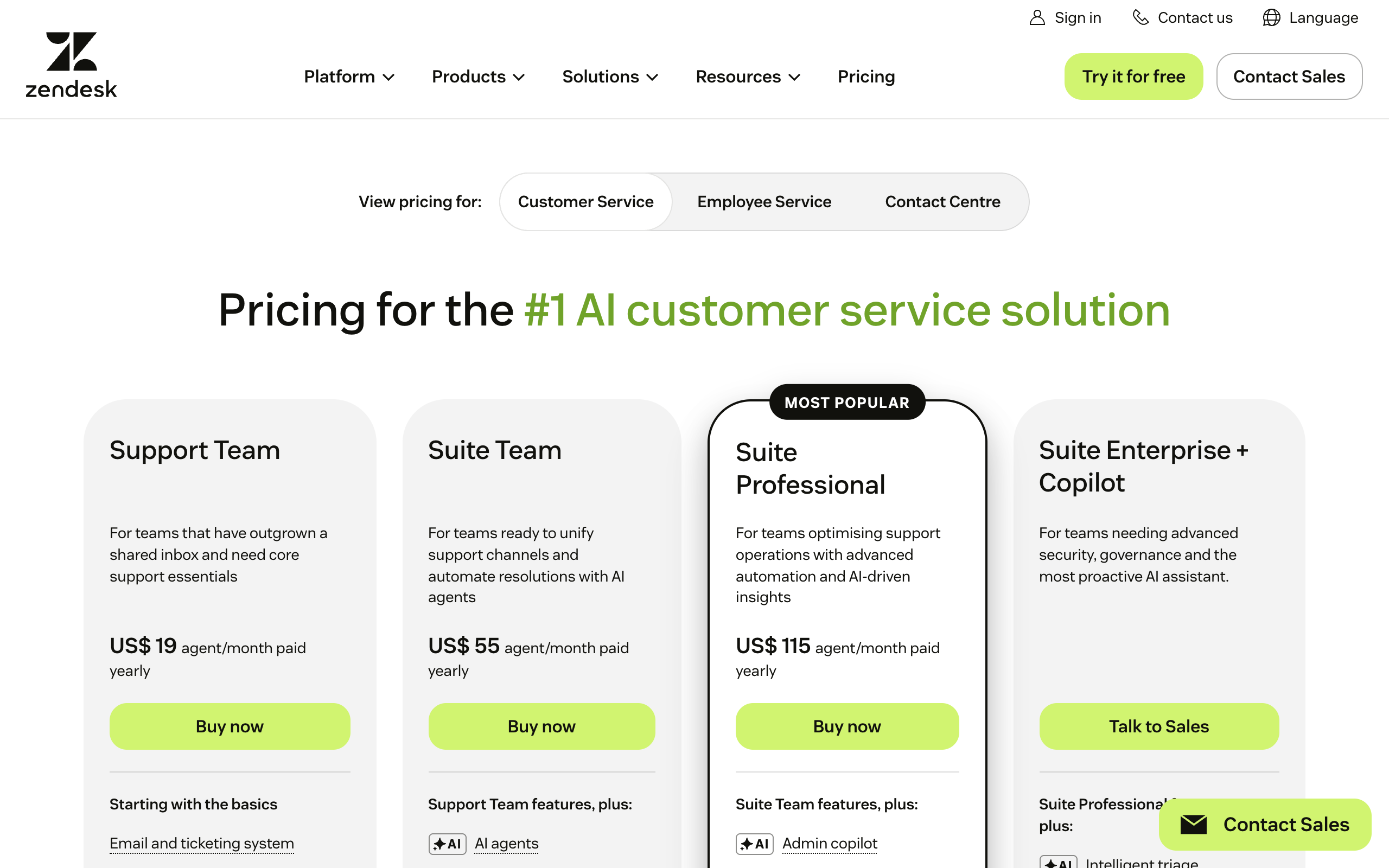
Zendesk includes AI agents in every Support and Suite plan. Support Team and Suite Team include 5 automated resolutions per agent a month, and Suite Professional includes 10. After that, pay-as-you-go costs $2.00 each, the highest listed rate on this page.
Zendesk counts a resolution when a large language model confirms the issue was solved with no human help. Email conversations close 72 hours after the first email. Copilot costs $50 per agent a month, paid yearly, on Suite Professional and above.
Trustpilot shows Zendesk at 1.7 from 742 reviews, with common complaints about support, usability, and price. Trustpilot says it does not verify the claims in reviews, so read the score as a list of complaints to check.
Pros
- AI agents come with every Support and Suite plan
- 5-10 automated resolutions per agent are included each month
- The lowest seat price on this page, at $19 an agent yearly
- A 14-day free trial
Cons
- $2.00 per resolution on pay-as-you-go, the highest listed rate here
- Copilot adds $50 per agent a month and needs Suite Professional or above
- Trustpilot shows 1.7 from 742 reviews
Pricing: Support Team is $19 an agent yearly or $25 monthly, and Suite Team is $55 yearly or $69 monthly. See Zendesk pricing.
Teams already on Zendesk that want AI on the help desk they know.
Gorgias
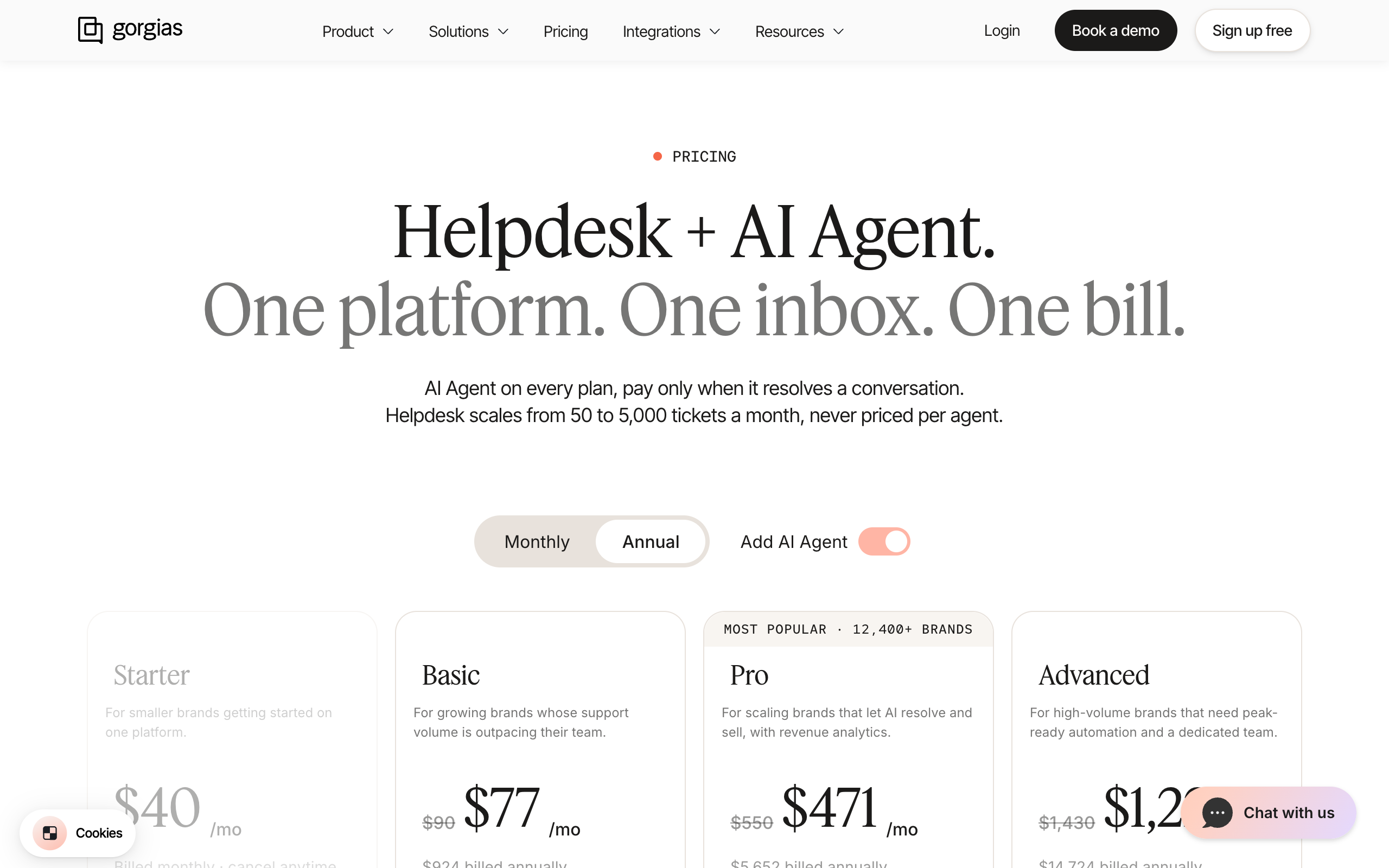
Gorgias describes itself as a conversational AI platform for ecommerce. It integrates with Shopify, BigCommerce, Magento, and WooCommerce. It prices by ticket and says it never prices per agent, which helps a growing store with a small team.
4.3/5·Shopify App Store(709)Check the price before you buy. The headline prices with AI Agent added include the help desk, so Basic shows $77 a month billed yearly, which is $50 plus $27 for 30 interactions. Each AI interaction also counts as a ticket. Trustpilot shows 2.0 from 153 reviews, and the complaints include incorrect AI replies and tickets closed without answers.
Pros
- Built for online stores, with Shopify, BigCommerce, Magento, and WooCommerce integrations
- Priced by ticket and never per agent
- A Starter plan at $10 a month yearly for 50 tickets
Cons
- Each AI interaction also counts as a ticket
- AI interactions above the allowance cost $1.50 each
- Trustpilot shows 2.0 from 153 reviews, with complaints about incorrect AI replies
Pricing: Basic is $50 a month yearly or $60 monthly for 300 tickets. AI Agent adds $27 a month yearly or $30 monthly for 30 interactions. See Gorgias pricing.
Online stores that want order data and AI replies in one help desk.
Tidio
Tidio combines live chat, ticketing, and an AI agent called Lyro. Messenger, Instagram, WhatsApp, and email integrations appear on every plan, and Lyro can also run on its own beside Zendesk, Salesforce, or another help desk.
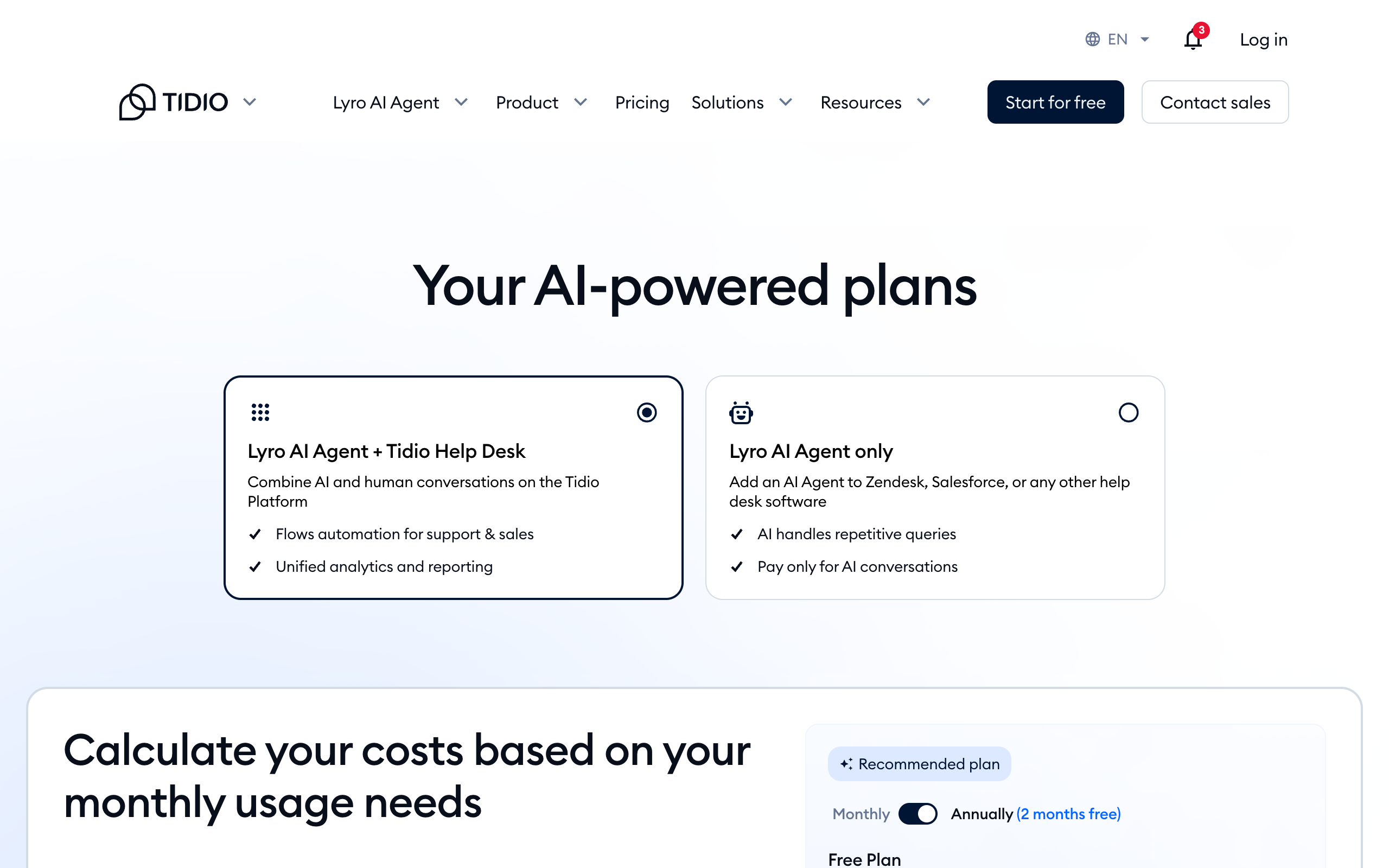
Tidio is the lowest-cost way to test AI chat on a small site. The free plan covers 50 conversations a month and 10 seats, and the first 50 Lyro AI conversations are free for the lifetime of the account.
4.8/5·Shopify App Store(1,355)The pricing page shows a toggle for annual billing but does not say which billing cycle its listed prices use, so confirm at checkout. Trustpilot shows 3.5 from 225 reviews, with complaints about reaching a person, Lyro's answers, and billing.
Pros
- A free plan with 50 conversations a month and 10 seats
- The first 50 Lyro conversations are free for the life of the account
- Lyro also runs as a stand-alone product beside another help desk
Cons
- Lyro is paid separately, from $32.50 a month for 50 conversations
- The page shows no Lyro price at 150 conversations
- Trustpilot shows 3.5 from 225 reviews, with complaints about reaching a person
Pricing: free for 50 conversations a month, Starter $24.17 a month, and Growth from $49.17 a month. See Tidio pricing.
Small sites that want to test AI chat at a low price before they commit.
Help Scout
Help Scout is a help desk built around a shared inbox, with live chat, SMS, WhatsApp, Instagram, and Messenger from the Standard plan. Its AI Drafts write replies from past conversations and help content, and Envoy answers customers from your knowledge base.
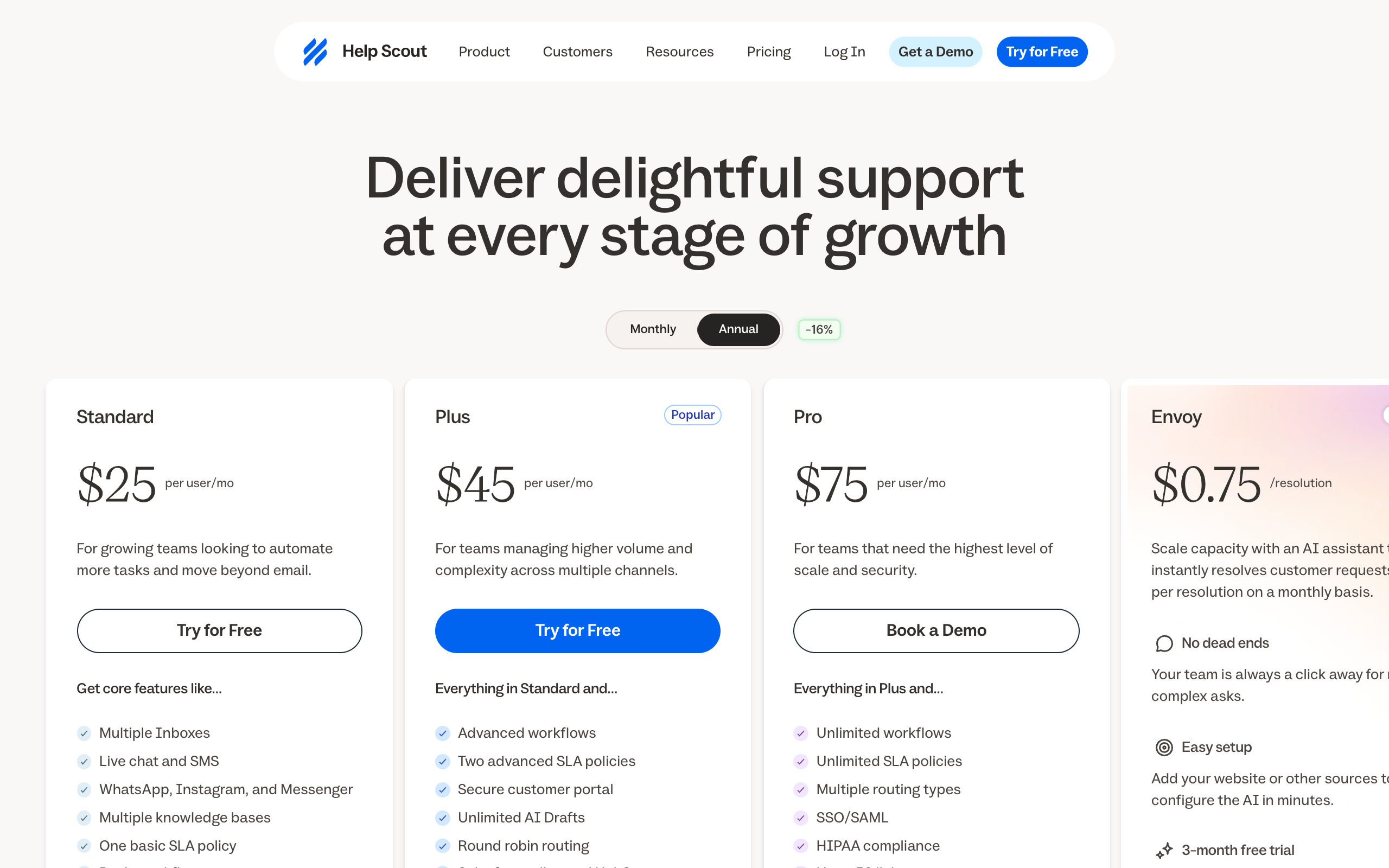
Help Scout suits a small team that wants a shared inbox with AI help. Plus costs $45 a user on annual billing and $54 monthly, and it includes unlimited AI Drafts, so a person still reads and sends each reply. Envoy adds AI resolutions at $0.75 each, with a monthly spending cap you can set.
Pros
- Unlimited AI Drafts on Plus, so a person checks every reply
- Envoy's $0.75 is the lowest per-resolution rate on this page
- A monthly spending cap on Envoy
- A free plan with 5 users, 1 inbox, and 1 docs site
Cons
- You pay per user, so the bill grows with your team
- Envoy is a paid add-on on top of the plan
- Plus costs $9 more a user on monthly billing
Pricing: Standard $25, Plus $45, and Pro $75 a user on annual billing, or $30, $54, and $90 monthly. Envoy costs $0.75 per resolution. See Help Scout pricing.
Small teams on a shared inbox that want a person to read every reply.
What it costs at 300 conversations a month
Dedicated tools cost about $185-320 a month in a simple small business example, and the bill grows with volume. The example assumes two seats, 300 conversations a month, and AI resolving 150 of them. The 150 is an assumption for the math, and no vendor guarantees it.
$0.75
Help Scout Envoy, per resolution
$0.99
Intercom Fin, per outcome
$1.50
Gorgias, per AI interaction above the allowance
$2.00
Zendesk, per automated resolution on pay-as-you-go
$0
Fin's charge for a handoff to a person
$0
Squad's charge per reply or resolution
| Tool | Seats or plan | AI usage | Monthly total |
|---|---|---|---|
| Gorgias Basic, yearly | $50 | 150 at $0.90 on a matching plan, or $27 for 30 plus 120 at $1.50 | About $185-257 |
| Help Scout Plus, yearly | $90 | 150 at $0.75, $112.50 | About $203 |
| Intercom Essential, yearly | $58 | 150 at $0.99, $148.50 | About $207 |
| Zendesk Support Team, yearly | $38 | 140 at $2.00, $280 | About $318 |
Tidio is left out because its page does not show a Lyro price at 150 conversations. Help Scout Plus on monthly billing adds $18 for two seats, which makes about $221.
The same example over one and three years
Small monthly gaps add up. These totals multiply the monthly figures above, and they assume your volume and the vendor's price stay the same.
| Tool | One year | Three years |
|---|---|---|
| Gorgias Basic, yearly | $2,220-3,084 | $6,660-9,252 |
| Help Scout Plus, yearly | $2,430 | $7,290 |
| Intercom Essential, yearly | $2,478 | $7,434 |
| Zendesk Support Team, yearly | $3,816 | $11,448 |
Help Scout Plus costs 36% less than Zendesk Support Team in this example
$202.50 against $318 a month saves $115.50 a month, $1,386 a year, and $4,158 over three years. The figures use two seats and 150 AI resolutions a month, and prices as of 2 November 2026.
What happens when volume doubles
Double the volume to 600 conversations, with 300 resolved by AI, and each usage-billed tool costs more. Help Scout Plus rises to about $315 a month, Intercom Essential to about $355, and Zendesk Support Team to about $618.
Zendesk's bill nearly doubles because its usage fee is the largest part of the total. Gorgias Basic stops at 300 tickets, so that volume needs a higher plan. Pro lists at $300 a month yearly before AI Agent.
Squad costs $99 a month plus a $100-200 AI plan, so roughly $199-299 a month before any optional extra. An inbox for a teammate is an optional $10 a month. Squad adds no charge per reply, and your AI provider's limits still apply.
These numbers are not like for like. A dedicated tool answers customers on chat within seconds. Squad works through your inbox and help desk, and your help desk bill stays separate. On support alone, a dedicated tool is the cheaper and simpler buy.
Squad's sum over the same periods is $2,388-3,588 a year and $7,164-10,764 over three years, before any optional extra. The figure stays the same as conversations grow, though your AI provider's limits still apply.
When to choose a dedicated support product
Choose a dedicated support product when customers expect an answer while they wait. Squad's docs describe no live website chat and no phone answering, so these situations belong to the tools above.
- Customers ask questions in a chat widget and expect a reply in seconds. Choose Intercom Fin or Tidio.
- You run an online store and want order data inside the help desk. Choose Gorgias.
- Your team already works in Zendesk and only needs AI on top. Choose Zendesk AI.
- You want a person to read every reply in a shared inbox. Choose Help Scout Plus.
- Support is your largest job by far, and you need help desk reports and routing.
- You need phone support. A call center product fits, and nothing on this page covers it.
Do customers expect live answers on your site?
- If yes→Buy a chat product such as Intercom Fin or Tidio
- If no, most support is email→Keep going
Is support your main recurring job?
- If yes→Buy a help desk with AI: Help Scout, Zendesk, or Gorgias for stores
- If no, it is one of several→Look at Squad, and keep any help desk you already have
Use-case cheat sheet
Match your situation to a pick. Each row uses the prices and limits from the sections above.
| Scenario | Best pick | Why |
|---|---|---|
| A software company with a busy chat widget | Intercom Fin | It answers in the widget, and you pay per outcome. |
| A team already running Zendesk | Zendesk AI | AI agents come with the plan you already pay for. |
| An online store with order questions | Gorgias | It is built for ecommerce and connects to store platforms. |
| A small site testing AI chat on a low budget | Tidio | The free plan covers 50 conversations a month. |
| Two people on one shared inbox who read every reply | Help Scout Plus | AI Drafts are unlimited on the plan. |
| An owner with support, invoices, and reports on one desk | Squad | One squad runs recurring jobs across your apps. |
| A team happy with its help desk that wants AI answers | Fin on your current help desk | The monthly minimum is $49, which includes 50 outcomes. |
| A business that runs support from Gmail and wants no help desk | Squad | A teammate works in Gmail and writes a summary of what needs you. |
| A consultant with 10 customer emails a week | No agent yet | Volume is too low to repay the setup. |
When Squad fits
Squad fits when support is one of several jobs eating your week. Squad gives you a squad, which is a team of specialist AI teammates that work in your apps, where a single assistant would have to do every job. For the wider picture, see AI for small business and AI agents for small business.
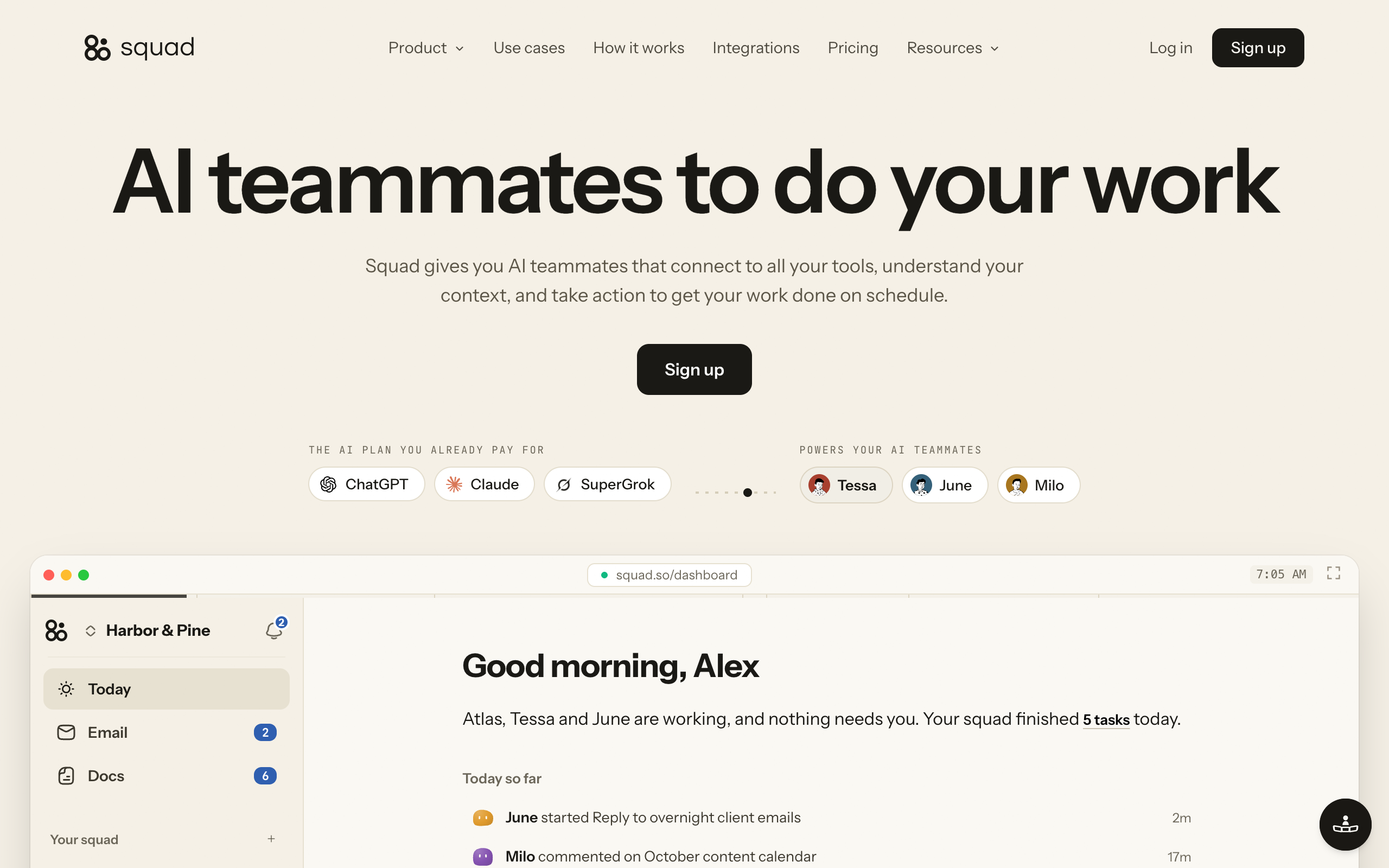
Choose or switch to Squad in these situations.
- Your support lives in Gmail, and you do not want to move to a help desk.
- You already use Zendesk, Intercom, or Gorgias, and you want sorting and pattern reports on top of it.
- You also need invoices chased, a weekly report, and quiet accounts checked.
- You want one teammate for support with its own access, kept out of the apps it does not need.
- You want a log of every run in History, and tasks you can read.
| Job | What the teammate does | Apps |
|---|---|---|
| Inbox triage | Sorts overnight messages and flags what needs you | Gmail, Zendesk, Intercom, Gorgias |
| Customer support | Drafts answers to repeat "how do I" questions from your docs | Gmail, Zendesk, Intercom |
| Refund handling | Checks each request against your rules and prepares it for your approval | Stripe, Gmail |
| Churn watch | Finds quiet accounts and drafts a check-in | Stripe, HubSpot |
| Weekly report | Puts revenue, refunds, and spend on one page every Monday | Stripe, Google Sheets |
| Support patterns | Reads recent tickets and reports the top repeat problems | Zendesk, Intercom, Gorgias |
Pros
- One $99 plan, with no charge per reply or per resolution
- Support sits beside invoices, reports, and other recurring jobs
- Access levels and No access per teammate, set in Squad
- A log of every run in History
Cons
- No live website chat and no phone answering
- No draft-only setting, so draft-first is an instruction
- No Shopify integration, and the Gorgias manual lists no separate reply action
- No free trial, and you also pay for your own AI plan
Pricing: Squad costs $99 a month plus a $100-200 AI plan, so roughly $199-299 a month before any optional extra. A teammate inbox is an optional $10 a month. See the Squad homepage and the costs page.
Owners who want support handled beside the other recurring jobs on their desk.
Setup is short. The build takes about two minutes, then a short onboarding conversation of about ten minutes with your chief of staff. Your chief of staff is the teammate that leads the squad and proposes the others for you to approve. Connect your apps, set each access level, and run support in drafts for the first week.
Squad has no free trial. Your first payment has a 7-day money-back guarantee, so test a real week of messages in that window.
When you do not need Squad
You do not need Squad if support is your only problem. A dedicated tool costs less, answers faster, and sits where customers already reach you. You also do not need it if you get a few emails a week. Write some saved replies, and check again when volume grows.
If your next step is email alone, read give an AI agent its own email inbox for how inboxes, send caps, and drafts work.
AI customer support FAQ
The basics
What is an AI agent for customer support?
An AI agent for customer support is software that reads customer messages, looks up an answer, and writes or sends a reply. Some agents run inside a help desk and answer customers directly. Others work across your apps, sort your inbox, and draft replies for you to check.
Can an AI agent replace a support person in a small business?
An AI agent can take over repeat questions, sorting, and first drafts. A person still needs to handle refund exceptions, angry customers, and anything legal. Most small businesses keep one owner or staff member on the messages that carry money or risk.
What is the best AI agent for customer service?
The best AI agent for customer service depends on your channel. Intercom Fin suits a business with a busy chat widget. Zendesk AI suits a team already on Zendesk. Gorgias suits online stores. Tidio suits small sites that want a low entry price. Help Scout suits teams that want AI drafts on a shared inbox. Squad suits owners who want support handled alongside other recurring jobs.
Will customers accept an AI agent in support?
Many customers are wary. In a Gartner survey of 5,728 customers in December 2023, 64% said they would prefer that companies did not use AI in customer service, and 53% said they would consider switching to a competitor if they learned a company planned to. Give customers a clear way to reach a person, and start with repeat questions.
Setup and cost
How do I automate customer support with AI?
Export 50-100 recent messages, sort them by type, and write your answers and refund rules down. Connect one inbox or help desk at a low access level. Run the agent on drafts for a week, then let it send only the reply types you have checked. Keep refunds on approval.
How much does an AI customer support agent cost?
Prices range from free entry plans to per-resolution billing. As of 2 November 2026, Fin costs $0.99 per outcome, Help Scout's Envoy $0.75 per resolution, and Zendesk $2.00 per automated resolution on pay-as-you-go. A business with 150 AI-resolved conversations a month and two seats pays about $185-320 a month on these tools.
What is per-resolution pricing?
Per-resolution pricing charges a fee each time the AI closes a conversation with no person involved. As of 2 November 2026, Help Scout's Envoy costs $0.75 per resolution, Intercom Fin $0.99 per outcome, and Zendesk $2.00 per automated resolution on pay-as-you-go. Each vendor counts a resolution in its own way, so read the definition before you compare prices.
How much does Squad cost for customer support?
Squad costs $99 a month plus a $100-200 AI plan, so roughly $199-299 a month before any optional extra. An email inbox for a teammate is an optional $10 a month. Your help desk subscription stays separate. Squad does not charge per reply or per resolution.
What should I look for in an AI customer support tool?
Check six things: the channels it answers on, how it bills and counts a resolution, how a customer reaches a person, what limits a setting enforces, where its answers come from, and how long you get to try it. Test it on your own messages before you let it send anything.
Squad and control
Does Squad send every reply for approval?
No. Squad has no draft-only setting. Teammates can draft for your approval and open a question before money moves; set access levels and send caps for anything that must not happen. Draft-first is an instruction you give the teammate, and a teammate can also send directly.
Can Squad answer live chat on my website or answer the phone?
Squad's docs describe no live website chat widget and no phone answering. Squad works in connected apps such as Gmail, Zendesk, Intercom, and Gorgias. If customers need instant answers on your site, use a chat product such as Intercom Fin or Tidio.
When should I choose a dedicated support product?
Choose a dedicated support product when customers expect live answers on chat, when support volume is your main problem, or when you run an online store and want order data inside the help desk. Add Squad when support is one of several recurring jobs you want off your desk.
Can I use Squad and a help desk together?
Yes. Squad connects to Zendesk, Intercom, and Gorgias, so a teammate can sort tickets and report patterns while your help desk stays in place. Your help desk bill stays separate. Teammates can reply in Zendesk and Intercom. The Gorgias manual lists no separate reply action, so use a teammate there for sorting and reports.
Sources
- Intercom pricing, seat prices, and how Fin counts resolutions, fetched 2 November 2026
- Fin pricing, fetched 2 November 2026
- Zendesk pricing and automated resolutions, fetched 2 November 2026
- Gorgias pricing and integrations, fetched 2 November 2026
- Tidio pricing, fetched 2 November 2026
- Help Scout pricing, fetched 2 November 2026
- Shopify App Store pages for Gorgias and Tidio, fetched 2 November 2026
- Trustpilot pages for Zendesk, Gorgias, and Tidio, fetched 2 November 2026
- Gartner survey as reported by Insurance-Canada.ca, fetched 2 November 2026
- Squad homepage, docs, control page, delegation guide, email docs, and manuals for Gmail, Zendesk, Intercom, and Gorgias, fetched 2 November 2026
Last updated: November 2026. Pricing and features verified as of 2 November 2026.